MSTC Tender Portal: Official Link, Login, Registration Steps
Access the official MSTC tender portal. Follow our guide for registration, login, and bidding to secure high-value government contracts with Indian PSUs.
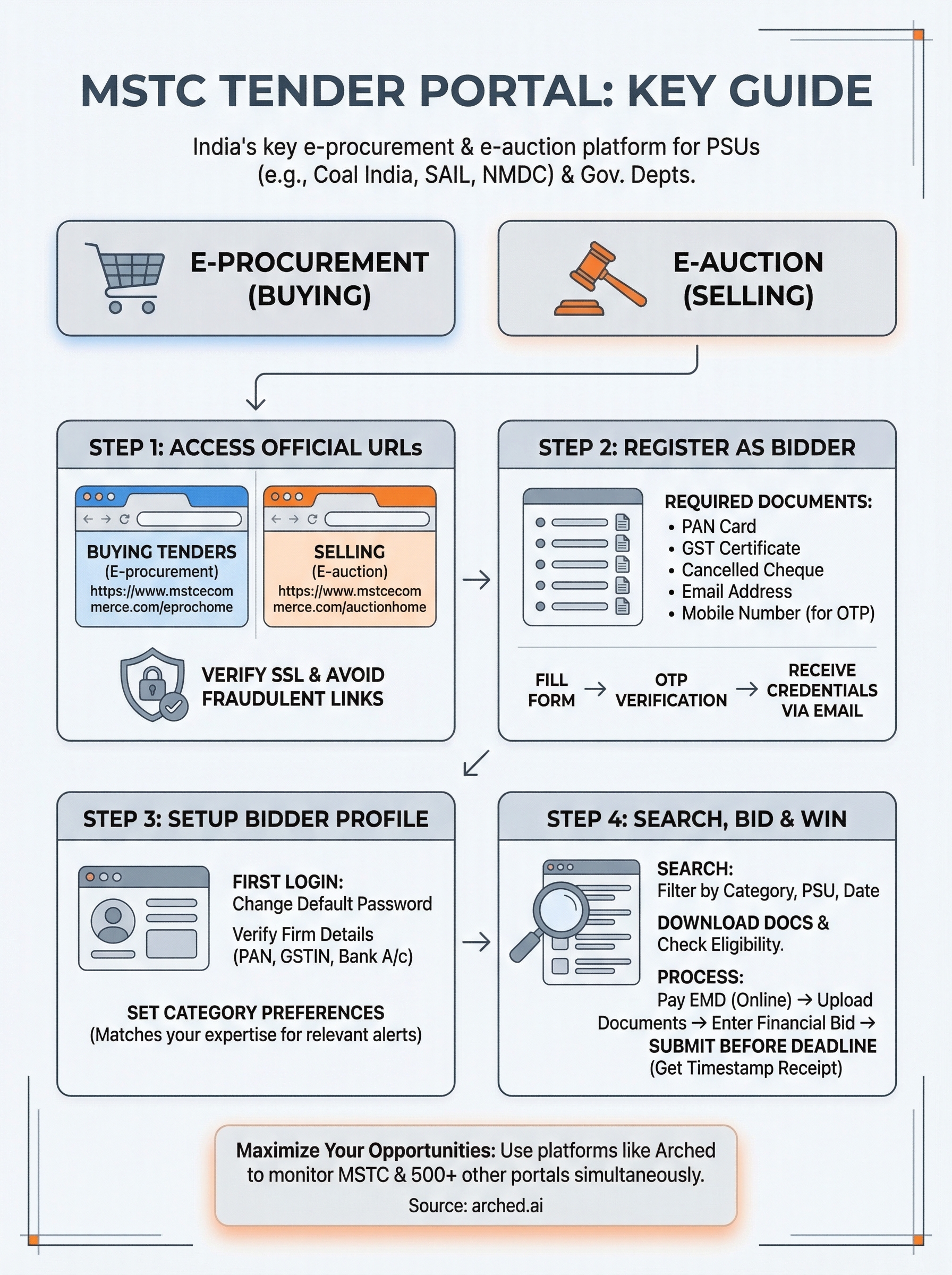
The MSTC tender portal is one of India's key e-procurement and e-auction platforms, handling tenders for public sector undertakings like Coal India, SAIL, and NMDC, among others. If you're in infrastructure or government contracting, chances are you've either used it or need to, and getting registered correctly is the first step toward participating in high-value auctions and tenders listed there.
But here's the reality: MSTC is just one of over 500 procurement portals active across India. Tracking opportunities across all of them manually is a grind. That's exactly why we built Arched, an AI platform that monitors portals like MSTC, GeM, CPPP, and hundreds of state-level e-tender systems, then matches opportunities to your firm's specific credentials and experience.
This guide walks you through the official MSTC portal link, the registration process, login steps, and how to navigate the platform so you can start bidding with confidence.
What the MSTC tender portal does
MSTC Limited is a Government of India enterprise under the Ministry of Steel. The mstc tender portal handles two core functions: e-procurement (buying) and e-auction (selling). Government departments, public sector undertakings (PSUs), and private companies use the platform to run competitive bidding processes for goods, services, and scrap disposal across India.
Types of Transactions MSTC Handles
MSTC runs both forward auctions (where sellers get the highest price) and reverse auctions (where buyers secure the lowest price). The platform also manages e-procurement tenders for large PSUs like Coal India Limited, NMDC, SAIL, and RINL. If your firm works in infrastructure, mining services, or industrial supply, you'll find relevant opportunities listed here regularly.
The platform covers a wide range of transaction types:
| Transaction Type | Description |
|---|---|
| E-auctions | Sale of scrap, coal, minerals, and surplus goods |
| E-procurement | Purchase tenders for goods, works, and services |
| Revenue auctions | Allocation of mining leases and natural resources |
| Private sector auctions | Corporates using MSTC's platform for their own sales |
MSTC processes thousands of crores in transactions annually, making it one of the most active government e-commerce platforms in India.
Who Uses the MSTC Portal
PSUs like Coal India and SAIL post their procurement requirements on MSTC because the platform provides a transparent, auditable bidding environment that satisfies government compliance standards. As a contractor or supplier, you can register as a bidder and participate in any listed tender or auction that matches your eligibility.
Your registration gives you access to active listings and document downloads, plus the ability to submit bids online. Unlike a static notice board, MSTC tracks your bid status and sends notifications for upcoming auctions tied to categories you've registered under.
Step 1. Open the official MSTC portal links
Before you register, you need to confirm you're on the correct official website. Fraudulent or outdated URLs circulate online, so going directly to the verified domain saves you from wasted effort or worse, a security risk.
Always verify the URL begins with "https://www.mstcecommerce.com" before entering any credentials or payment details.
The Correct URLs to Bookmark
The mstc tender portal runs across two distinct sections on the same domain, one for e-procurement and one for e-auctions. You'll use different login paths depending on whether you're participating in a purchase tender or a sale auction.
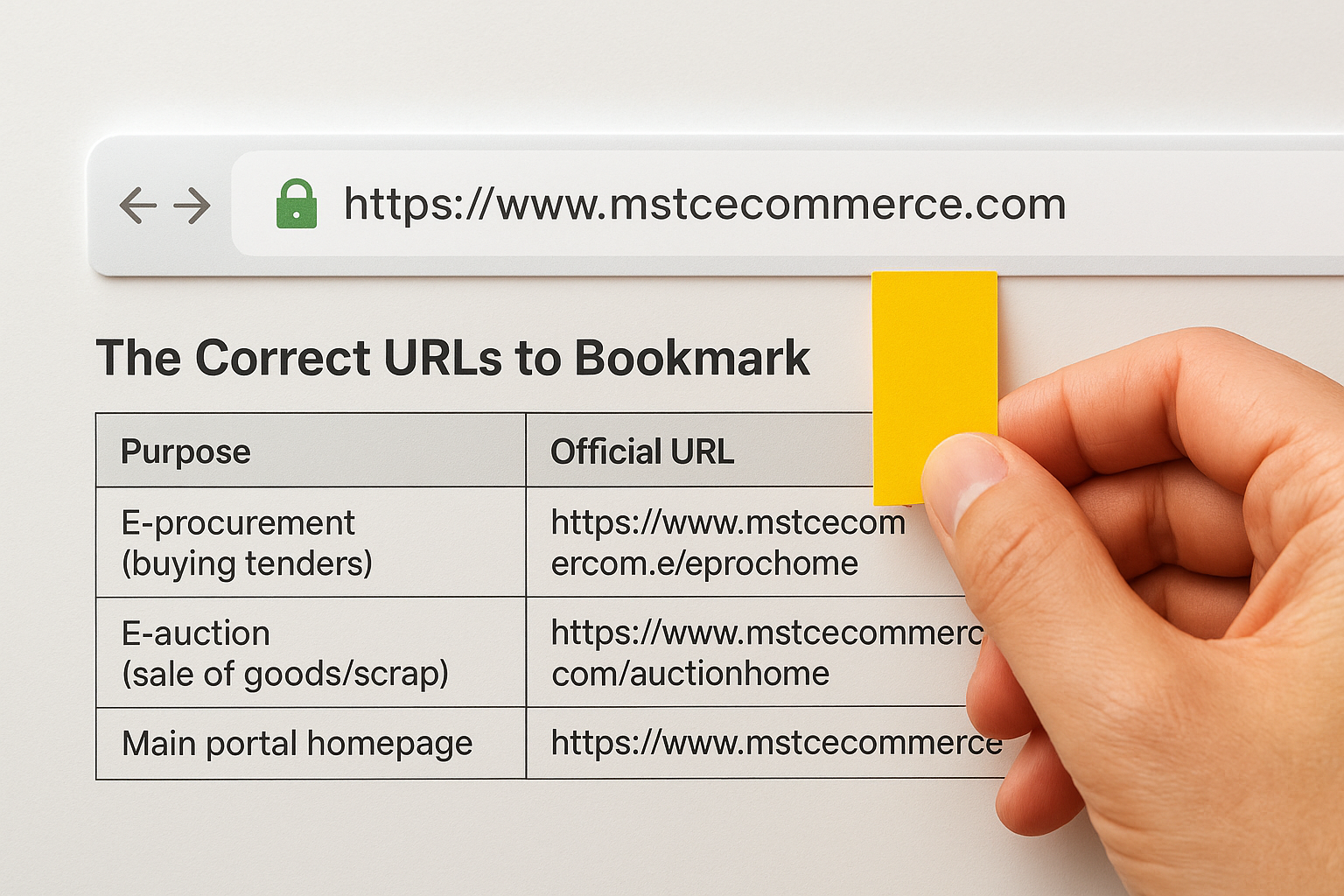
| Purpose | Official URL |
|---|---|
| E-procurement (buying tenders) | https://www.mstcecommerce.com/eprochome |
| E-auction (sale of goods/scrap) | https://www.mstcecommerce.com/auctionhome |
| Main portal homepage | https://www.mstcecommerce.com |
What to Check Before Proceeding
Once you land on the homepage, confirm the SSL certificate is valid (the padlock icon shows in your browser's address bar). From the homepage, you'll see separate buttons for buyer and seller login. Select "E-Procurement" if your firm is bidding on PSU purchase contracts, or "E-Auction" if you're buying scrap or surplus goods.
Step 2. Register as a bidder on MSTC
Registration on the mstc tender portal is free for buyers participating in e-procurement. You'll complete the entire process online, but you need to have specific documents ready before you start to avoid getting stuck midway through the form.
Documents You Need Before You Start
Gather these before you open the registration form. Missing even one item can stall your application and force you to restart.
| Document | Details Required |
|---|---|
| PAN card | Firm or individual PAN |
| GST registration certificate | Valid and active GSTIN |
| Cancelled cheque | Matches your registered bank account |
| Email address | Used as your primary login ID |
| Mobile number | Linked to the business, OTP will be sent here |
How to Complete the Registration Form
Navigate to mstcecommerce.com/eprochome and click "New Registration." Fill in your firm's name, PAN, GST number, and contact details exactly as they appear on your official documents. The portal sends a one-time password (OTP) to your registered mobile number to verify your identity before the account is created.
Complete all mandatory fields in a single session; the portal does not save partial registrations automatically.
After OTP verification, you'll receive a confirmation email with your login credentials. Store these securely, since you'll use them for every tender listing and auction notice tied to your account.
Step 3. Log in and finish your bidder profile
Once you receive your credentials, return to the mstc tender portal and click the "Buyer Login" button on the e-procurement homepage. Enter your registered email and the password sent in your confirmation email, then complete the OTP step before the system grants you full access to the bidder dashboard.
Change your default password immediately after your first login to protect your account from unauthorized access.
Navigate the Dashboard on First Login
Your first login lands you on the bidder dashboard, where you'll see tabs for active tenders, your firm profile, document uploads, and notification preferences. Before you search for any tender, take a few minutes to confirm that your firm name, PAN, GSTIN, and bank account details all display correctly under the profile section. Any mismatch between your profile data and your submitted documents can cause a bid to get rejected at the eligibility stage.

Add Your Category Preferences
The portal lets you select commodity categories that match your firm's specific work scope. MSTC uses these preferences to send you relevant tender alerts automatically, so choose categories that align with your actual past project experience, such as civil works, electrical installations, or mechanical services. Accurate category selection saves you time and puts the right opportunities in front of you each time you log in.
Step 4. Find tenders, auctions, and bid
With your profile complete, you're ready to start using the mstc tender portal to locate and bid on live opportunities. Use the "Search Tenders" option on your dashboard to filter listings by category, PSU name, or closing date.
Search for Relevant Listings
The portal's search function lets you narrow results using commodity category, publishing date, and organization name. For example, if your firm handles civil construction for PSUs, filter by category "Civil Works" and set the date range to the current week to see only active, relevant listings. Open each tender notice to download the full document package, which includes the eligibility criteria, BOQ, and submission deadlines.
Read the eligibility criteria in the tender document before spending any time on your bid submission, since disqualifying conditions are often buried in the detail.
Submit Your Bid
Once you confirm your firm meets the eligibility requirements, follow these steps to place your bid:
- Click "Participate" on the tender listing page
- Pay the Earnest Money Deposit (EMD) online through the portal
- Upload your required documents, such as PAN, GST certificate, and experience certificates
- Enter your financial bid amount and submit before the closing time
The portal timestamps your submission and sends a confirmation receipt to your registered email automatically.
Wrap up and plan your next bid
You now have everything you need to register on the mstc tender portal, log in, set up your profile, and submit your first bid. The platform covers a wide range of PSU procurement and auction opportunities, and getting your account active puts you in position to compete for high-value contracts from organizations like Coal India, SAIL, and NMDC.
The harder challenge is staying on top of MSTC alongside the hundreds of other portals where relevant opportunities appear. Manually checking each one burns time your BD team could spend on bid preparation and qualification analysis. Arched monitors MSTC and over 500 other portals simultaneously, matches opportunities to your firm's actual credentials, and flags tenders you qualify for before the window closes.
If you want to stop missing bids and start building a predictable pipeline, explore what Arched can do for your firm.