GeM OEM Panel Registration: Steps, Documents, Approval
If you manufacture products and want to sell them to government buyers on the Government e-Marketplace, you first need to complete your GeM OEM panel registration. This process establishes your brand on the portal, lets you list your product categories, and gives you the authority to authorize resellers who can fulfill orders on your behalf. Without it, your products simply won't appear in the marketplace where thousands of government departments place their procurement orders daily.
The registration process itself isn't complicated, but it does involve specific documentation, catalog creation rules, and an approval workflow that trips up many first-time applicants. Missing a single requirement, whether it's a brand authorization letter, a test certificate, or the correct product specification format, can delay your approval by weeks. Understanding exactly what GeM expects before you start the application saves you from unnecessary back-and-forth.
This guide breaks down the entire OEM panel registration process: eligibility criteria, required documents, step-by-step application walkthrough, and how to manage your panel once approved. If you're planning to establish your brand on GeM, this is where you start.
What the GeM OEM panel is and when you need it
The GeM OEM panel is a dedicated administrative interface within the Government e-Marketplace that gives manufacturers direct control over their brand identity, product listings, and reseller network on the portal. When you register as an OEM, GeM recognizes you as the authoritative source for a specific brand and product category. This means government buyers see your brand as verified, and any resellers listing your products must operate under permissions you grant. Without this registration, your brand has no official standing on the portal, even if your products are already being sold there through third parties.
How the OEM panel differs from a standard seller account
A standard GeM seller account lets you list products and fulfill orders directly. The OEM panel goes further by giving you brand ownership rights within the marketplace. As an OEM, you can approve or reject catalogs submitted under your brand name, set technical specifications that all listings must follow, and control which resellers get permission to sell your products. This distinction matters because government buyers on GeM often filter products by brand and OEM authorization status, so an unauthorized catalog can undercut your pricing and damage your brand's reputation in the government procurement space.
If a reseller lists your products on GeM without your authorization and you have no OEM registration, you have no mechanism to challenge or remove that listing.
Your seller account and OEM account can coexist on the portal. You can sell directly as a seller while simultaneously managing resellers through the OEM panel. Most manufacturers who supply to government departments set up both, because this dual structure maximizes sales reach while keeping full brand control in your hands.
When OEM registration is mandatory
You need OEM registration in specific situations, and knowing these triggers saves you from applying prematurely or missing the window entirely.
You must complete GeM OEM panel registration when:
- Your products fall under categories where GeM requires OEM approval before any listing goes live
- You want to authorize distributors or dealers to fulfill government orders on your behalf
- A reseller has applied to list your brand and GeM sends you a brand ownership query
- You want to set mandatory technical specifications that all catalog listings under your brand must meet
- Your product category requires a Make in India compliance declaration that only an OEM can submit
Some product categories on GeM are "OEM-exclusive," meaning no seller can list them without prior OEM approval. Electronics, defense-adjacent equipment, and certain specialized machinery typically fall into this bucket. If your category carries this restriction, your resellers stay blocked from listing until you complete the approval process and grant explicit authorization.
What you control through the OEM panel
Once approved, the OEM panel gives you three primary controls: brand management, catalog oversight, and reseller authorization. Under brand management, you upload product specifications, test certificates, and supporting documents that define what a compliant listing looks like. Under catalog oversight, you review and either approve or flag any catalog another seller submits under your brand. Reseller authorization lets you generate and revoke authorization letters directly from the panel, removing the need to send physical documents each time a new dealer wants to onboard.
Checking the panel regularly also shows you active listings under your brand, so you can spot pricing inconsistencies or specification mismatches before a government buyer flags them. This level of visibility is what makes OEM registration worth completing even when it is not strictly mandatory for your category.
Documents and prerequisites to apply without delays
Gathering your documents before you open the GeM portal saves you from abandoning a half-completed application. The system times out on inactive sessions, and uploading documents piece by piece across multiple sittings increases the chance of version mismatches or expired certificates slipping through. Treat this checklist as your pre-flight check: nothing moves forward cleanly without every item ready in the correct format.

Business registration and identity documents
GeM verifies your legal identity as a manufacturer before granting OEM status. You need your Udyam Registration certificate (for MSMEs) or a standard company registration document, along with your GST registration certificate showing the same business name used on your GeM seller profile. The names must match exactly; even minor spelling differences trigger manual verification and add days to your timeline.
Prepare scanned copies in PDF format under 2 MB each, as GeM's upload interface rejects larger files without displaying a clear error message.
Your PAN card tied to the business entity and a cancelled cheque or bank passbook copy for the registered bank account round out this category. If your business operates under a trade name different from the legal entity name, include a trademark registration certificate to support the brand ownership claim.
Product and brand credentials
This is where most gem oem panel registration applications stall. GeM requires proof that you actually manufacture or hold rights to the brand you are registering. Prepare the following before you start:
| Document | Purpose |
|---|---|
| BIS or ISO certification | Confirms product quality and manufacturing standards |
| Test reports from accredited labs | Validates specifications you will set for resellers |
| Brand registration or trademark certificate | Establishes your legal ownership of the brand name |
| Manufacturing license or factory registration | Proves you produce the product rather than simply trade it |
| Make in India declaration (if applicable) | Required for categories under the public procurement preference policy |
Your product catalog draft with technical specifications, model numbers, and HSN codes should also be ready at this stage. Writing these specifications clearly matters because resellers must match them exactly when listing under your brand, and any ambiguity creates approval disputes that delay your entire onboarding.
Step 1. Prepare your seller profile and complete vendor assessment
Your GeM seller profile is the foundation for everything that follows. Before you can access the OEM panel, GeM requires a fully verified seller account under the same legal entity you plan to register as an OEM. If your seller profile has incomplete bank details, a mismatched GST name, or a pending email verification, the OEM application will either not appear or get rejected immediately. Treat your seller profile like a prerequisite exam: you cannot skip it.
Set up your seller account with exact legal details
Navigate to gem.gov.in and register using your Aadhaar-linked mobile number or the authorized signatory's credentials. During registration, enter your business name exactly as it appears on your GST certificate. GeM's system runs an automatic cross-check between your GeM profile and the GST Network (GSTN) database, and any variation causes a flag that requires manual review.
Once logged in, complete each profile section fully:
- Business details: Legal name, CIN or LLPIN (for companies), Udyam number (for MSMEs)
- Bank account: Active current account with IFSC code matching your cancelled cheque
- Contact information: Business email address that you actively monitor, since GeM sends all status alerts there
- Authorized signatory: Name and designation matching your board resolution or partnership deed
Save your seller account login credentials separately before moving to vendor assessment, since the OEM panel login uses the same credentials and session timeouts are short.
Complete vendor assessment before submitting the OEM application
GeM requires sellers to clear a vendor assessment before they can apply for OEM status. For primary sellers with a turnover above a certain threshold, this involves a third-party inspection through agencies like M/s ICICI Bank or Dun & Bradstreet, coordinated directly through the GeM portal. Smaller sellers below the MSME threshold may qualify for a self-certification route instead.
To initiate vendor assessment, go to "My Profile" > "Vendor Assessment" within your seller dashboard and follow the on-screen prompts. You will pay a nominal fee and schedule an inspection if required. The assessment typically takes five to ten business days to complete. Only after your assessment status shows "Verified" in the dashboard should you move to the gem oem panel registration steps, because submitting before that point resets your application queue.
Step 2. Apply for brand approval and OEM dashboard in the OEM panel
With your seller profile verified and vendor assessment cleared, you can now initiate the actual gem oem panel registration within the portal. This step is where GeM formally recognizes your brand and grants you access to the OEM dashboard. The application form asks for brand-level details rather than transaction-level data, so your focus here shifts from business identity to product category ownership and manufacturing credentials.
Navigate to the OEM panel and initiate brand approval
Log in to your GeM seller account and look for the "OEM Panel" option in the left navigation menu. If you do not see it, confirm that your vendor assessment status shows "Verified" on your dashboard, as GeM only displays the OEM panel link after that step clears. Once inside the OEM panel, click "Apply for Brand Approval" to open the brand registration form.
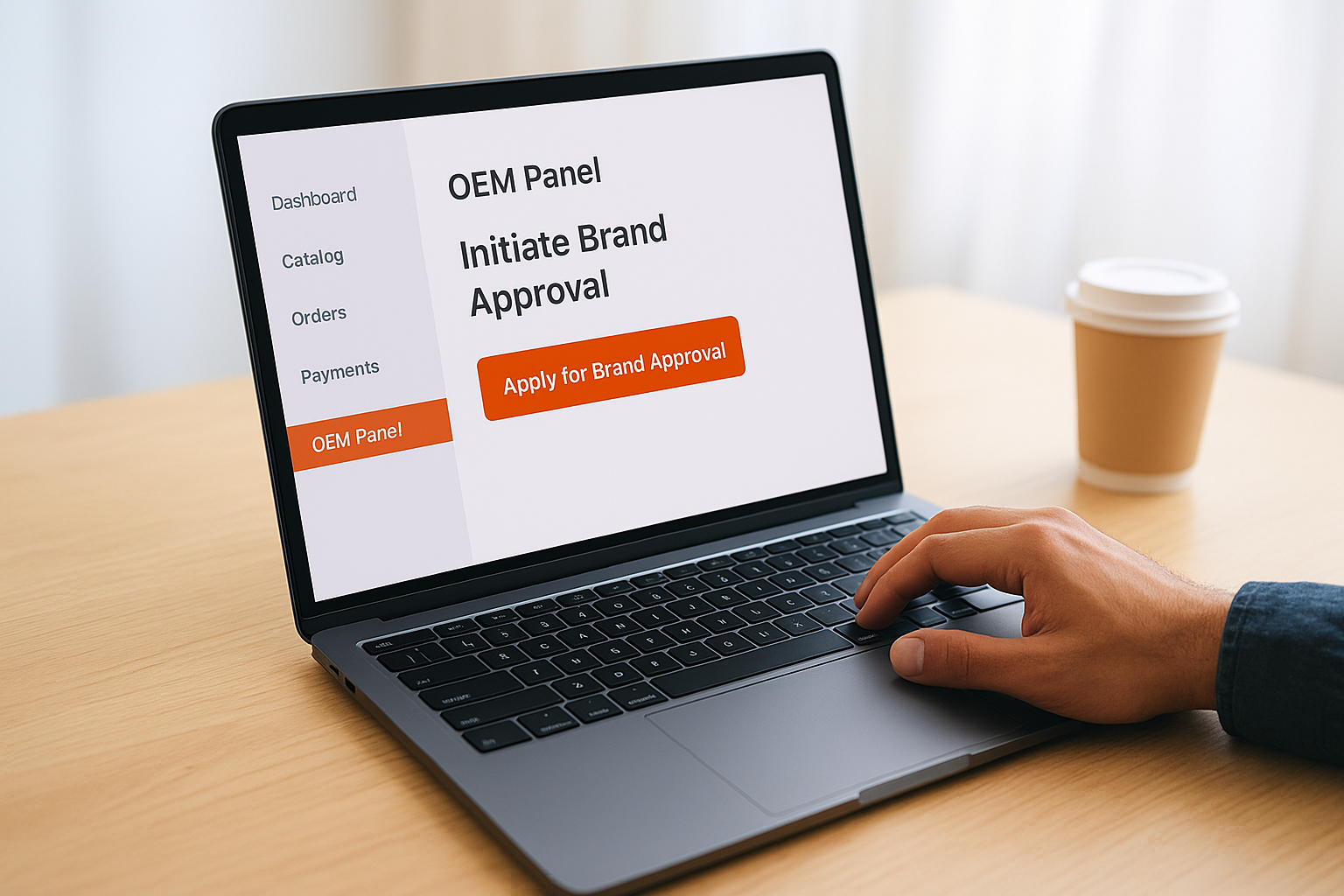
GeM assigns brand applications to a category-specific review team, so the portal section you land on after clicking "Apply" may look different depending on your product category.
Work through the form in this sequence:
- Select your product category from the dropdown; choose the most specific subcategory available, since broader categories attract more scrutiny during review
- Enter your brand name exactly as it appears on your trademark certificate or manufacturing license
- Upload your brand ownership proof (trademark registration or equivalent) in PDF, under 2 MB
- Upload test certificates and BIS or ISO documents for the product specifications you plan to set
- Submit a sample catalog with at least one model number, HSN code, and complete technical specification sheet
Fill in product specifications that resellers must follow
After the brand details section, the form asks you to define mandatory product specifications for your category. These specifications become the benchmark GeM uses to approve or reject any catalog submitted under your brand. Be precise: list voltage ranges, material grades, dimensions, or performance ratings with exact values rather than ranges wherever possible.
Vague specifications like "high quality finish" will not pass GeM's internal review. Instead, write entries like "Surface coating: hot-dip galvanized, minimum 85 microns thickness per IS 2629." This level of technical specificity protects your brand and speeds up the review team's assessment of your submission.
Step 3. Track status, handle queries, and get approval faster
After you submit your brand approval application, your gem oem panel registration enters a review queue managed by GeM's category team. This stage is not passive: the portal sends queries, requests additional documents, and updates your application status in real time. Checking your dashboard every two to three business days during this period keeps you ahead of any requests before they age and push your application further back in the queue.
Where to find your application status in the portal
Log in to your seller account and navigate to "OEM Panel" > "My Brand Applications" to see the current status of each submission. GeM uses a set of status labels that indicate exactly where your application stands:

| Status Label | What it means |
|---|---|
| Under Review | Category team is actively assessing your submission |
| Query Raised | GeM has a specific question or document request waiting for your response |
| Approved | Your brand is live and you can now manage resellers and catalogs |
| Rejected | Application declined; the portal will display a reason code |
A "Query Raised" status does not mean your application is failing. It means the reviewer needs clarification before they can proceed, and a clear, prompt response typically moves the file to approval within a few business days.
How to respond to GeM queries without delays
When GeM raises a query, you receive an email alert on your registered address and a notification inside the portal. Open the query from the "My Brand Applications" screen and read the exact language of the request before drafting your response. Category reviewers often ask for supporting evidence such as a notarized manufacturing declaration, an updated test report with a more recent lab date, or a corrected HSN code on your sample catalog.
Respond directly inside the portal's query response field rather than replying to the email, since email replies do not update your application record. Attach the requested document in PDF format, then write a one-paragraph note in the response field that explicitly addresses the reviewer's question. For example, if the query reads "Trademark certificate name does not match registered business name," your response note should read: "Attached updated trademark certificate showing legal name change from [Old Name] to [New Name] as registered on GeM. Supporting board resolution also attached." Specific language that mirrors the reviewer's own wording reduces the chance of a follow-up query on the same point.
Actions that speed up approval
Beyond responding quickly to queries, two practical steps help you move through the review stage faster. First, call the GeM helpdesk at 1800-419-3436 and quote your application reference number if your status has not changed for more than ten business days. GeM's helpdesk can flag stalled applications to the category team. Second, verify that your business email address on the portal is one you check daily. Missed query notifications add unnecessary delays since GeM gives applicants a response window before closing an unanswered query and requiring a fresh submission.
Step 4. Use the OEM panel to manage resellers and catalogs
Once your gem oem panel registration is approved and your brand shows as live in the portal, the real work begins. The OEM panel is now your operational control center for everything related to how your brand appears to government buyers: who sells your products, what specifications they list, and what prices they publish. Treating this panel as a set-and-forget tool is a mistake that lets unauthorized or misconfigured listings accumulate under your brand name.
Authorize resellers and issue permissions through the panel
Navigate to "OEM Panel" > "Reseller Management" in your dashboard to start authorizing distributors and dealers. Each reseller you want to activate on GeM must have an existing GeM seller account before you can grant them permission. Once you confirm their GeM seller ID, click "Authorize Reseller," enter their ID, and select the product categories they are permitted to sell under your brand. GeM generates a digital authorization record that the reseller can reference when submitting their catalog.
You can revoke a reseller's authorization at any time from the same screen, which immediately blocks them from submitting new catalogs under your brand.
Keep a simple log outside the portal of every reseller you authorize, including their GeM seller ID, authorization date, and the product categories covered. This record helps you cross-check if an unrecognized catalog appears under your brand, since the portal search does not always make unauthorized listings immediately obvious.
Review and approve catalog submissions
When an authorized reseller submits a catalog under your brand, you receive a notification in your OEM dashboard under "Pending Catalog Approvals." Open each submission and compare the listed technical specifications against the mandatory criteria you set during brand registration. Check HSN codes, model numbers, and compliance declarations line by line before clicking "Approve" or "Return for Correction."
If a submission has an error, use the "Return for Correction" option with a written note specifying exactly what the reseller must fix. For example: "Model number listed as XR-200B does not match approved model list. Please update to XR-200A as per attached specification sheet." Precise feedback saves a second review round and keeps your catalog clean and consistent across all resellers selling to government departments.
Wrap up and next steps
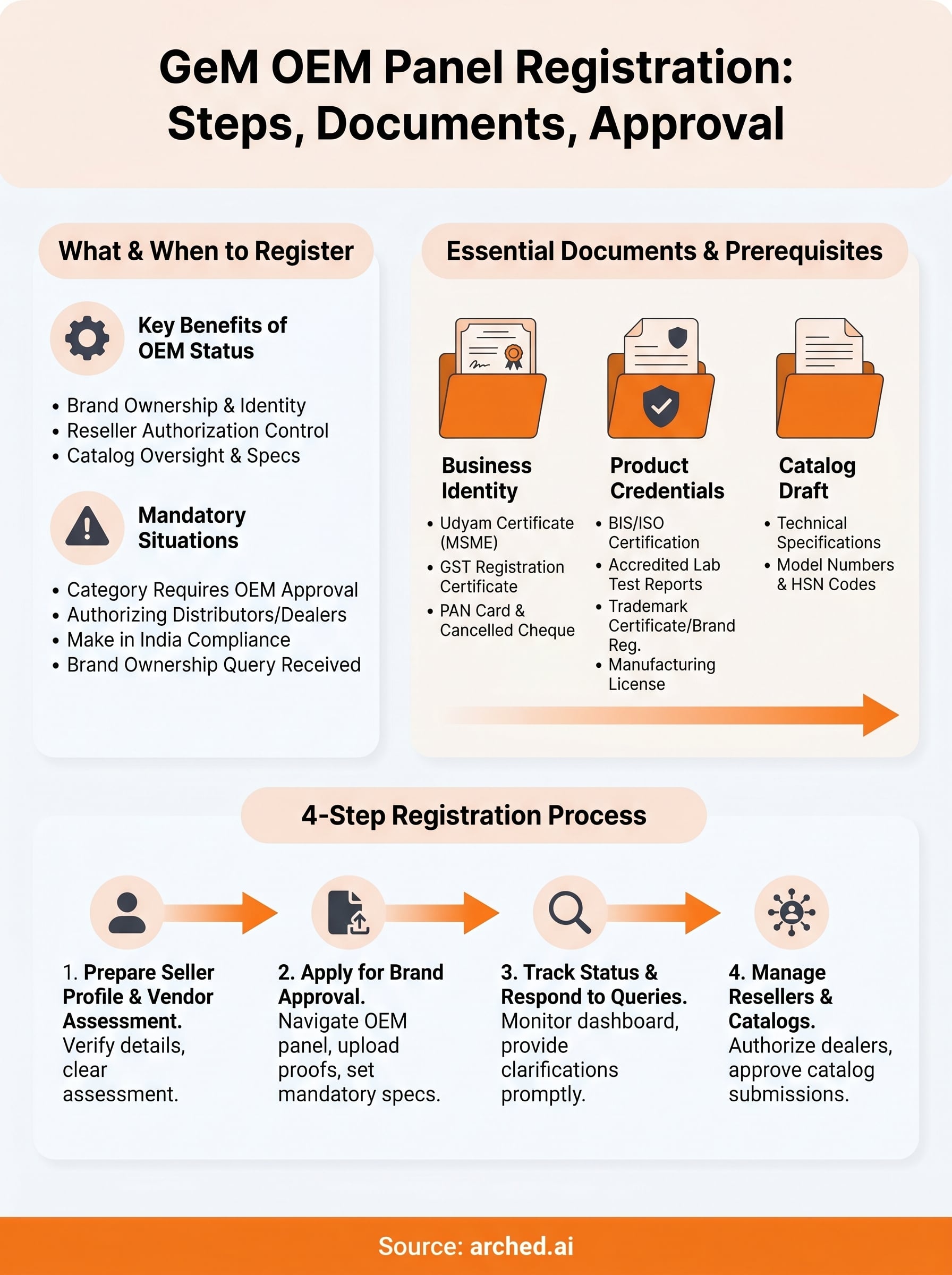
Completing your gem oem panel registration gives you verified brand ownership on GeM, direct control over reseller permissions, and the ability to set specifications that protect your catalog quality. The process moves in a clear sequence: verify your seller profile, clear vendor assessment, apply for brand approval, respond to queries promptly, and then actively manage your resellers and catalog submissions once approved. Each step builds on the previous one, so skipping ahead or submitting incomplete documents creates delays that are easy to avoid.
Your GeM registration is one part of a broader government procurement strategy. Winning contracts consistently requires knowing which tenders match your credentials, tracking bid deadlines across multiple portals, and identifying where your firm needs to build stronger qualifications. For works tenders, a reviewed estimate and BOQ is part of that: see how Arched's estimating service works.
Have a package your team can’t get to? Send it to us. Our engineers check and sign off everything we deliver.