GeM Reverse Auction Process: Step-By-Step Rules for Sellers
Master the GeM reverse auction process with this step-by-step guide. Learn bidding rules, decrements, and compliance to win more government contracts.
Winning government contracts on GeM isn't always about quoting the lowest price upfront. In a gem reverse auction process, sellers compete in real time by progressively lowering their bids until the auction closes, and the rules governing how this works catch many first-time participants off guard. Understanding the exact workflow, eligibility criteria, and bidding mechanics before you enter an auction is the difference between landing a contract and wasting your time.
This guide breaks down every step of the reverse auction process on GeM, from how buyers trigger one, to how you as a seller can participate, place bids, and avoid common disqualification traps. We've built it around the official GeM guidelines and real procedural details so you can walk into your next auction prepared, not guessing.
At Arched, we help infrastructure firms and government contractors cut through procurement complexity using AI-driven tender intelligence across 500+ portals, including GeM. This article is part of that mission, giving you the clarity you need to compete with confidence on India's largest public procurement platform.
What a GeM reverse auction is and when it starts
A GeM reverse auction is a competitive bidding event where multiple sellers drive the price down in real time rather than submitting a single sealed quote. Unlike a standard bid where you submit your price once and wait, the gem reverse auction process puts you in a live environment where other registered vendors can see the current lowest bid rank and undercut it within a set time window. The buyer defines the product or service, sets a reserve price as the ceiling they're willing to pay, and the auction runs until no one places a lower bid before time expires.
How the mechanism works
GeM uses a descending price model, which means each successive bid must be lower than the current L1 (lowest bid) by a minimum decrement defined in the auction terms. For example, if the current L1 bid is ₹10,00,000 and the minimum decrement is 1%, your next valid bid cannot exceed ₹9,90,000. The platform automatically rejects bids that don't meet this decrement rule, so you need to calculate your floor price before the auction opens, not during it.
The minimum bid decrement is set by the buyer and published in the auction notice. Always check this figure before you place your first bid.
Your bid rank is visible to other participating sellers as L1, L2, or L3 position, but the actual rupee amount stays hidden. This prevents direct price anchoring while still giving you enough competitive signal to decide whether to go lower or hold your position.
When buyers trigger a reverse auction
Buyers on GeM can initiate a reverse auction when the estimated procurement value crosses a defined threshold, or when multiple sellers are registered under a specific product or service category. The buyer sets the auction duration, typically between 30 minutes and a few hours, and GeM notifies all eligible sellers automatically. You'll see reverse auctions most commonly triggered across these categories:
- Construction materials and standardized equipment
- High-volume consumables with multiple approved vendors
- Service contracts where multiple sellers hold active GeM registrations
- Repeat procurements where historical pricing data is already available
Before you participate, get your account ready
Jumping into the gem reverse auction process without verifying your account status first is how sellers get locked out at the worst moment. GeM runs automatic eligibility checks before an auction opens, and if your seller profile is incomplete or your compliance documents have lapsed, the platform excludes you with no manual override. Spending 15 minutes auditing your account before each auction cycle prevents exactly that situation.
Check your seller profile and compliance documents
Your GeM seller registration must show an active status with a verified PAN, Aadhaar-linked mobile number, and bank account details matching your business name exactly. Log into your seller dashboard, navigate to the Profile section, and confirm your ITR filing and GST registration are current, since GeM cross-checks these against government databases in real time.
GeM deactivates sellers whose compliance documents expire without sending a prior warning, so review your filing deadlines at least 30 days before each renewal date.
Confirm your listing is mapped to the right category
Each offering must be live and correctly mapped to the product or service category the buyer specified in the auction notice. Run through this checklist before bidding opens to confirm your eligibility:
- Price range: your listed price must leave room to bid at the buyer's minimum decrement level
- Minimum order quantity: must match or fall below what the buyer has defined
- Delivery location: must cover the destination state or district specified in the auction notice
Step 1. Read the bid, specs, and auction rules
Before you place a single bid in the gem reverse auction process, open the auction notice and read every field. GeM publishes the full bid document in your seller dashboard under Active Auctions, and it contains details that directly control whether your bids are valid or rejected outright.
Locate the critical auction parameters
The auction notice includes four fields you must record before the live window opens. Write these down or keep the notice open in a second tab during the auction:

| Parameter | Where to find it | Why it matters |
|---|---|---|
| Reserve price | Auction header | Sets the ceiling; your first bid must fall at or below this |
| Minimum decrement | Bid rules section | Each bid must be lower by at least this percentage |
| Auction duration | Bid rules section | Tells you how long the live window stays open |
| Auto-extension rule | Bid rules section | Window extends if a bid lands in the final minutes |
If a bid arrives within the last few minutes of the auction, GeM typically extends the window by 10 minutes to allow a counter-bid, so never assume the clock is final.
Check technical specifications against your listed product
Your product or service listing must match the buyer's technical specifications exactly. Pull up your GeM catalog entry and compare it line by line against the spec sheet in the bid document. Any mismatch in unit, grade, or delivery scope gives the buyer grounds to reject your L1 bid after the auction closes.
Step 2. Place your initial bid and confirm ranking
Once the gem reverse auction process goes live, your first move is to submit an opening bid that positions you competitively without giving away your pricing floor too early. Navigate to the Active Auctions tab in your seller dashboard, locate the auction, and click Place Bid. GeM will show you the reserve price as the upper limit and prompt you to enter your quoted amount.
How to calculate and submit your opening bid
Your opening bid should sit below the reserve price but leave you room to go lower across multiple rounds. A practical approach is to calculate your minimum acceptable margin first, then set your opening bid 5 to 10% above that floor. This gives you room to counter without going below cost.
| Scenario | Reserve price | Your floor | Suggested opening bid |
|---|---|---|---|
| Standard product | ₹10,00,000 | ₹8,50,000 | ₹9,20,000 |
| High-competition | ₹10,00,000 | ₹9,00,000 | ₹9,40,000 |
Never open at your floor price, since you lose all flexibility to counter once another seller matches or beats you.
Reading your rank after submission
After submitting, GeM immediately displays your rank as L1, L2, or L3 relative to other participants. Check this rank before assuming you are in a winning position. If you land at L2 or lower, you need to decide quickly whether to lower your bid or hold and monitor how many bidders are ahead of you.
Step 3. Bid during the live window and avoid errors
Once the live window opens in the gem reverse auction process, your goal is to monitor your rank actively and respond to position changes without rushing into bids that cut your margin too thin. Keep your seller dashboard open and refresh it every 30 to 60 seconds, since GeM does not always push instant notifications when a competitor undercuts you.
Watch the clock and counter-bid strategically
Your bidding pattern matters as much as your price. Placing bids too early in the window signals your floor to competitors and triggers a rapid price war. Instead, hold your position until the final 10 to 15 minutes, then respond if another seller has displaced you from L1. This approach preserves your margin across the early phase and forces competitors to commit first.

If the auto-extension rule triggers, stay alert for at least one additional round before assuming the auction has closed.
Common errors that get bids rejected
Three errors account for most failed bids during live auctions, and each one is avoidable with a quick pre-bid check:
- Decrement violation: your new bid does not clear the minimum percentage drop from the current L1
- Catalog mismatch: your active listing price is higher than the bid you are trying to submit, which GeM flags as inconsistent
- Session timeout: your dashboard logs you out mid-auction, so keep your session active by clicking within the page every few minutes
Quick recap and what to do after the auction
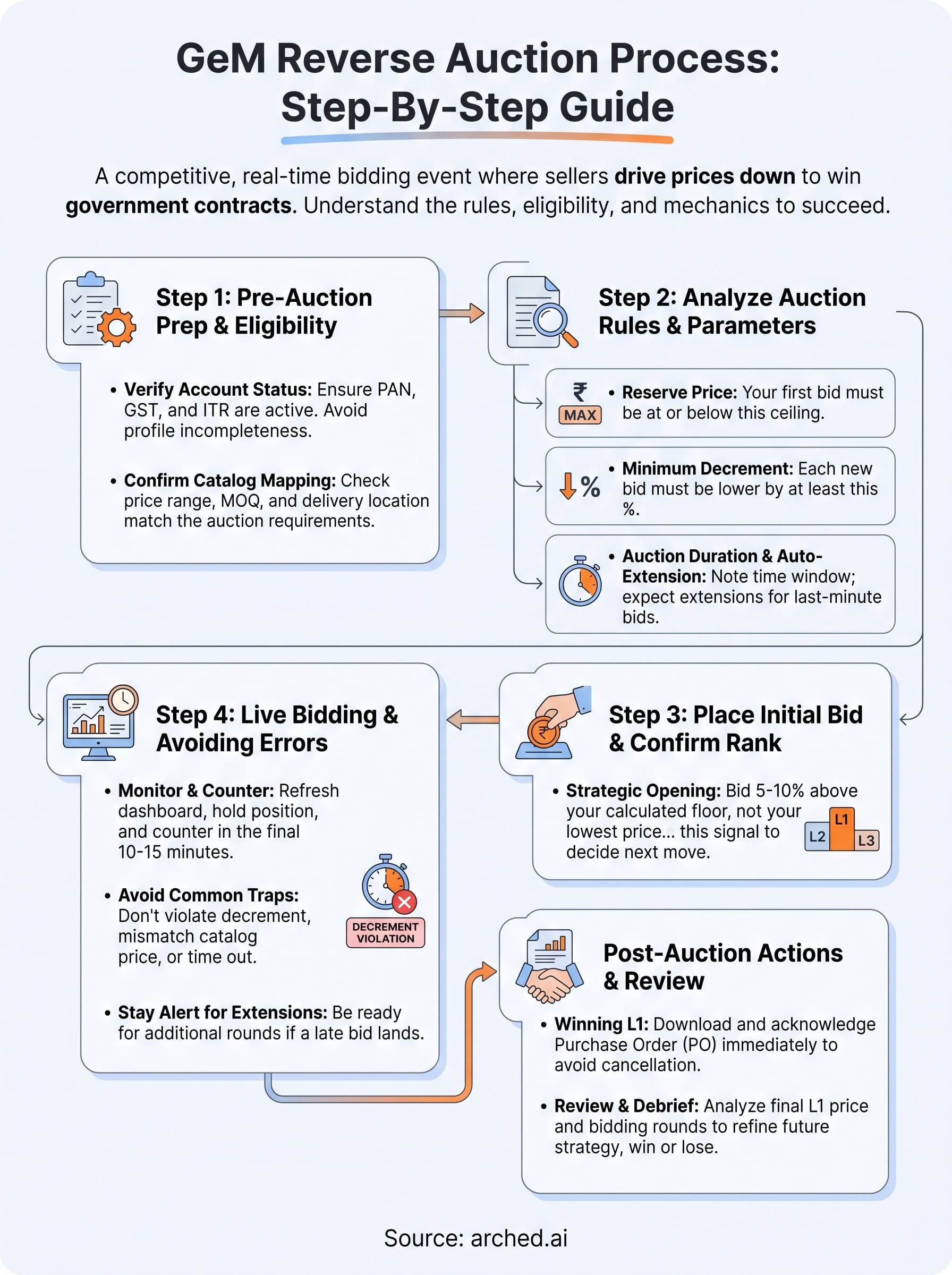
The gem reverse auction process follows a clear sequence: verify your account, read the auction parameters, open with a strategic bid, and counter-bid in the final window while avoiding decrement and catalog errors. If you win L1 when the clock stops, GeM sends a purchase order to your registered email within a defined processing period. Download and acknowledge it immediately, since delayed acknowledgment can trigger automatic order cancellation.
After the auction closes, whether you won or lost, review your bid data while the numbers are fresh. Note the final L1 price, your opening bid, and how many rounds the auction ran. This debrief sharpens your pricing strategy for the next round. If you lost, check whether a catalog mismatch or decrement error cost you the position.
Managing multiple GeM auctions alongside hundreds of other portals is where most BD teams lose time. See how Arched handles tender intelligence at scale so your team focuses on winning contracts, not tracking portals.