Contract Lifecycle Management Software Pricing: Cost Guide
Government contractors in India's AEC sector juggle dozens, sometimes hundreds, of active contracts at any given time. From GeM awards to state-level infrastructure projects worth crores, each contract carries its own timelines, compliance requirements, and renewal dates. That volume makes contract lifecycle management software pricing a real budget line item, not just a theoretical consideration. Yet most firms start their search with no clear benchmark for what these tools actually cost, which puts them at a disadvantage before they even request a demo.
Pricing for CLM platforms varies wildly. Some vendors charge per user, others per contract volume, and a few bundle everything into flat annual fees. The difference between the cheapest and most expensive option can easily be 5–10x, and the priciest choice isn't always the best fit. For infrastructure firms and BD teams that win a steady flow of government work, a CLM tool often becomes the logical next step, managing the contracts you win.
This guide breaks down the actual cost ranges, pricing models, and hidden fees you'll encounter when evaluating CLM software. We've organized it so you can compare vendors side by side, understand what drives price differences, and figure out a realistic budget. Whether you're a mid-size contractor exploring your first CLM purchase or a large consultancy looking to switch providers, you'll walk away with the numbers you need to make a confident decision.
Why CLM pricing matters for procurement teams
For firms active in India's government contracting sector, contract management is not administrative overhead, it's a revenue function. Every contract you win through a GeM award, a CPPP tender, or a state e-procurement portal carries specific deliverables, payment milestones, and compliance checkpoints. Mismanaging even one of them can trigger penalties, delay payments, or disqualify your firm from future bids. That's why understanding contract lifecycle management software pricing before you buy actually matters: the wrong tool, or worse, an overpriced one your team stops using after three months, costs you more than any subscription fee.
The cost of manual contract tracking
Most BD and bid management teams in AEC firms still track contracts through a mix of spreadsheets, shared drives, and calendar reminders. This approach breaks down quickly once your active contract count crosses a dozen, and the operational gaps it creates are predictable: missed renewal dates, overlooked compliance submissions, and lost document versions. The cost here isn't just wasted time; it's the rupee value of penalty clauses triggered and rebid efforts that could have been avoided entirely.
A single missed compliance deadline on a highway project worth five crore can cost your firm more than an entire year of CLM software subscription fees.
Here's what manual tracking typically costs procurement teams:
- 3 to 5 hours per week per bid manager spent chasing contract status across portals and inboxes
- 10 to 15% of contracts reaching renewal or milestone dates without proactive alerts in place
- Significant rework cycles when document versions get mismatched across project teams and geographies
How contract volume drives the buying decision
Your firm's active contract volume is the single biggest factor in determining which CLM tier actually fits your operation. A small consultancy managing 15 to 20 active government contracts per year has very different needs than a mid-size infrastructure company running 80 to 100 simultaneous projects across multiple states. Paying for enterprise-level functionality when your volume doesn't justify it wastes budget that could go toward business development resources or qualification upgrades that open higher-value tenders.
Underbuying carries equal risk. Choosing a basic tool because the price looks comfortable, and then outgrowing it within 18 months, means you absorb migration costs, retraining time, and workflow disruption on top of a new subscription. Building your CLM budget around your projected three-year contract volume, not just your current workload, produces a more reliable estimate and keeps you from making the same purchase decision twice.
Connecting CLM spend to revenue outcomes
Procurement teams that frame CLM software as a cost tend to underinvest in it. Teams that treat it as a revenue protection tool make sharper buying decisions. Every contract your firm wins represents a defined cash flow. The role of a CLM platform is to protect that cash flow by keeping milestones on track, surfacing renewal opportunities early, and flagging non-compliance risks before they become financial liabilities.
Framing the spend correctly also makes internal budget approvals easier. When you can show leadership that a CLM platform directly reduces penalty exposure and protects payment timelines on active projects, the conversation shifts from "can we afford this" to "what does it cost us not to have it."
What you actually pay for in a CLM platform
Most CLM vendors present a single headline price, but that number rarely reflects what you'll actually spend in the first year. Understanding the cost components inside a CLM subscription helps you compare vendors accurately and avoids the budget shock that comes when an implementation invoice lands two weeks after you've signed. Before you evaluate any contract lifecycle management software pricing quote, break it into its functional parts.
Core platform features
The base subscription typically covers contract creation, storage, and milestone tracking, which are the non-negotiable features any CLM tool needs to deliver. Beyond that, vendors layer on capabilities like automated alerts, approval workflows, version control, and reporting dashboards. Each of these additions may be included in one tier and priced separately in another, which is why two quotes at the same monthly figure can deliver very different functionality. When you review a vendor's pricing page, map each feature against your firm's actual workflow before you decide which tier fits.
Pay close attention to where vendors draw the line between their standard tier and their "enterprise" tier, because that boundary usually sits right at the features you need most.
- Automated deadline and renewal alerts
- Multi-user approval workflows
- Audit trails and version history
- Custom reporting and analytics
- Role-based access controls
Integration and implementation fees
Most mid-range and enterprise CLM platforms charge separately for implementation, which can include data migration, system configuration, and initial training. For infrastructure firms that store project data across multiple portals, ERP systems, and shared drives, migration and integration work often costs as much as six months of the subscription itself. Ask vendors for a fixed implementation estimate upfront, not a range, so you can include it in your total budget from day one.
Ongoing support and training costs
Vendors structure support packages differently. Some include basic email support in the base price and charge a premium for dedicated account management or priority response times. Your team's technical comfort level should guide how much support coverage you budget for, particularly if your BD or bid management staff will be the primary users. Factor in time costs too: getting three to five people trained on a new platform takes real working hours away from active bids.
Common CLM pricing models and how they work
Contract lifecycle management software pricing doesn't follow a single standard structure across vendors. Understanding the model behind a quote matters as much as the number itself, because the same annual spend can produce very different cost trajectories depending on how your firm grows, adds users, or increases contract volume. Each model favors a different type of buyer, and picking the wrong one locks you into a structure that gets more expensive as your operation scales.
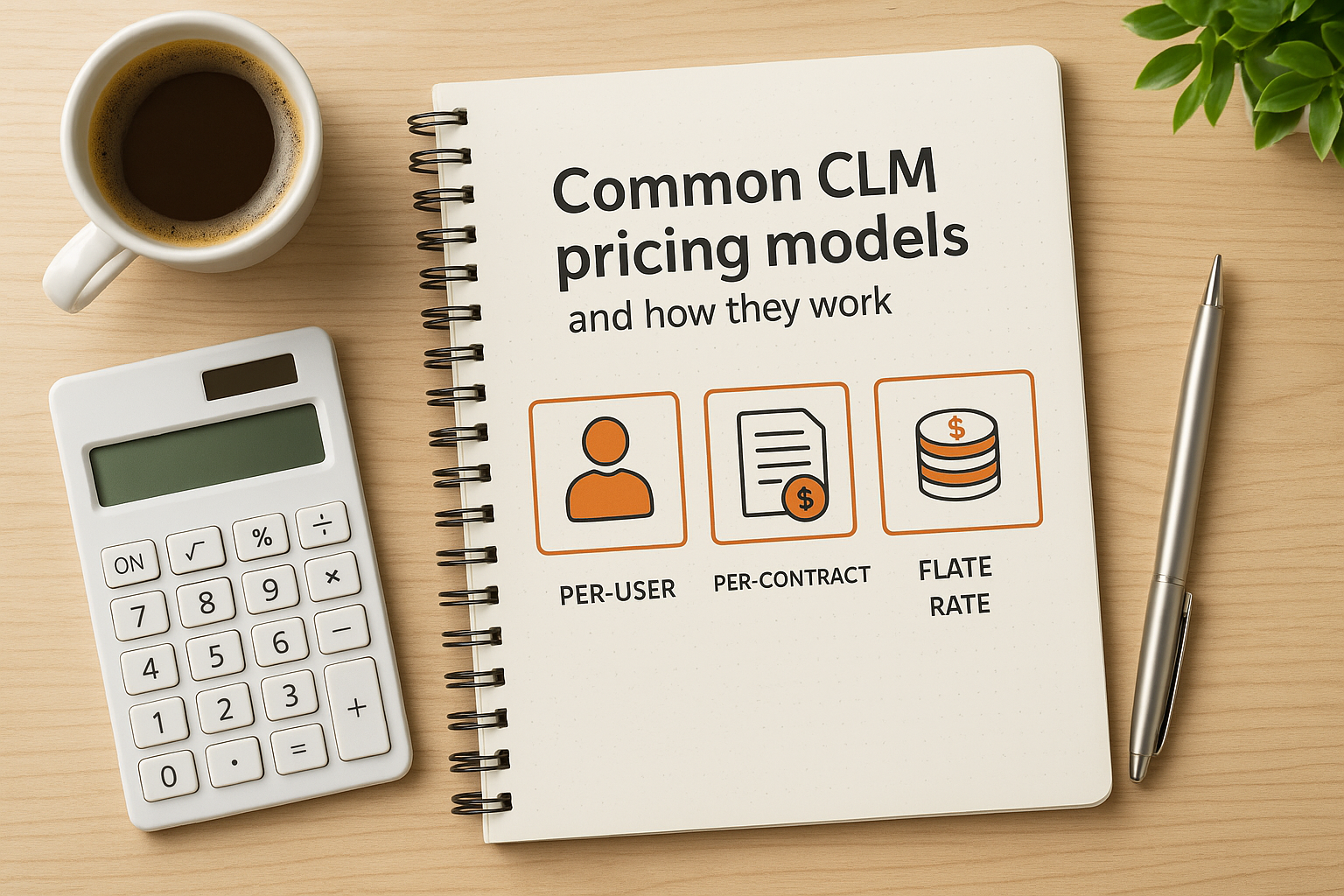
Per-user pricing
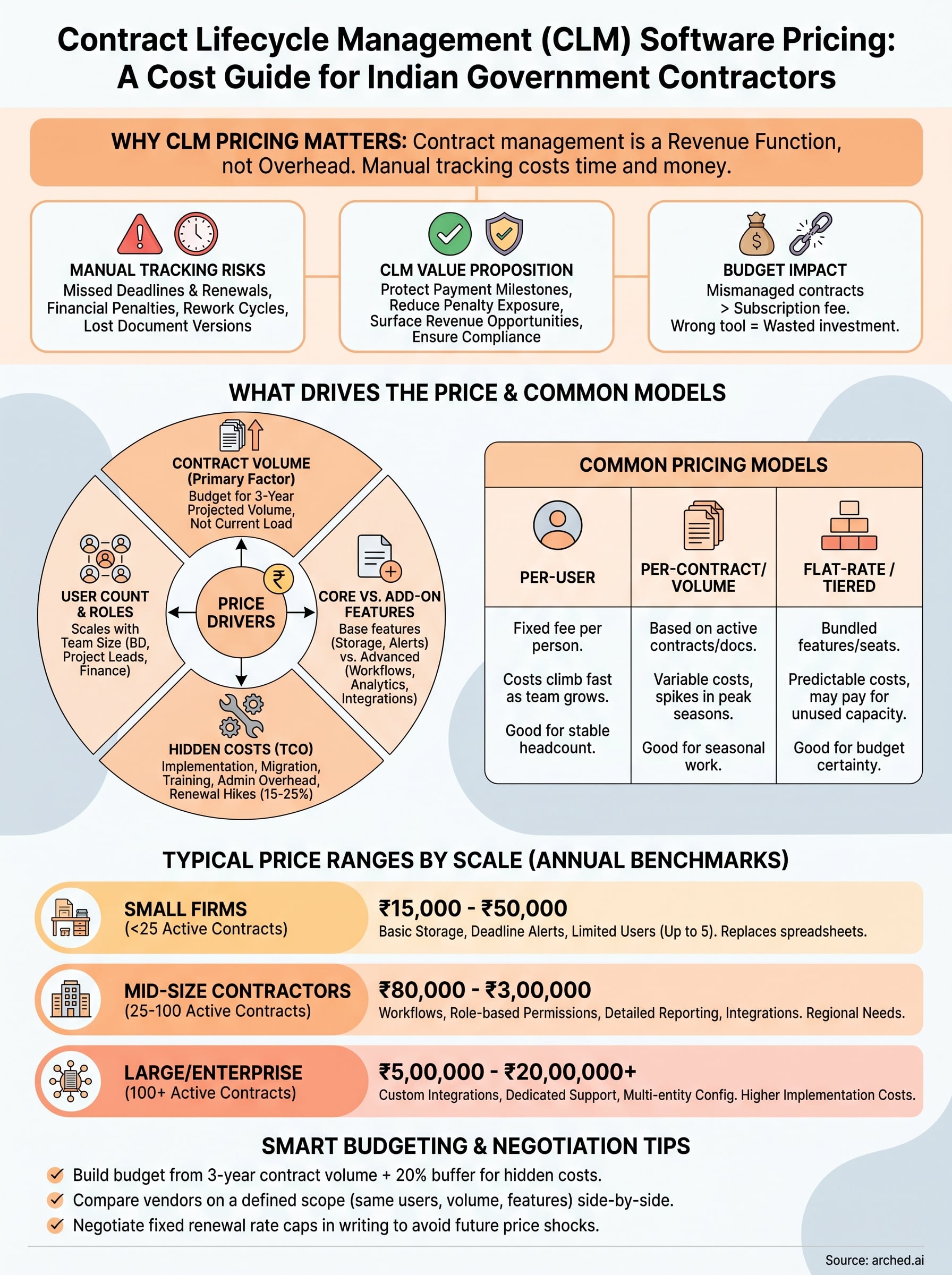
Per-user pricing charges a fixed monthly or annual fee for each person who accesses the platform. This model is straightforward to forecast when your team size is stable, but costs climb fast as you add BD staff, project managers, or regional offices. For infrastructure firms expanding into new states or scaling up headcount alongside a growing project pipeline, per-user rates that seemed reasonable in year one can push the annual bill significantly higher by year three.
Map your expected headcount growth over 24 months before committing to any per-user contract, so you're budgeting for where your team will be, not where it is today.
Per-contract or volume-based pricing
Volume-based models charge based on the number of active contracts or documents processed within a billing period. This structure works in your favor during slow quarters when bid activity drops, but it can spike unpredictably during peak tendering seasons when your firm is managing multiple simultaneous submissions. If your government contracting work follows seasonal patterns tied to budget cycles or project award timelines, ask vendors whether volume tiers reset monthly or annually, since that distinction changes your exposure during high-activity periods.
Flat-rate and tiered subscription pricing
Flat-rate models bundle a defined set of features and user seats into a single annual fee. These are easier to budget for and protect you from usage spikes, which makes them attractive for firms that want predictable costs. Tiered subscriptions work similarly but let you step up to the next feature set as your needs grow. The practical limitation is that tier boundaries often don't align cleanly with where your firm actually sits, which means you may pay for capabilities you won't use for another two years.
Typical CLM price ranges by company size and needs
Contract lifecycle management software pricing varies significantly depending on the scale of your operation, the number of users who need access, and the depth of features your workflow requires. The ranges below reflect what firms in India's government contracting sector can realistically expect to spend, broken down by company size. Use these as working benchmarks when you build your budget, not as fixed targets, since actual quotes will shift based on the vendor and the specific modules you select.
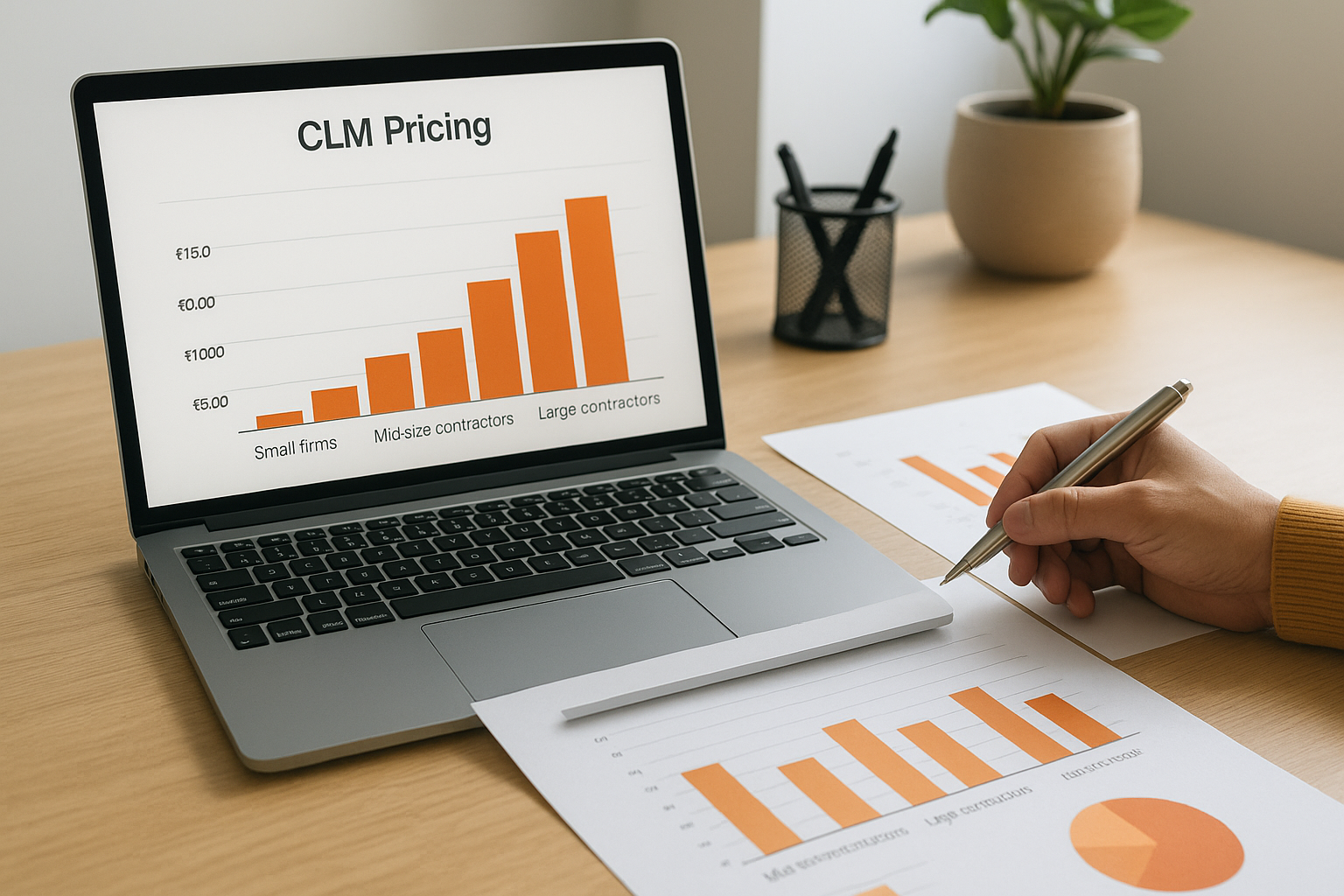
Small firms and consultancies managing up to 25 active contracts
Smaller consultancies and boutique infrastructure firms typically find workable options in the entry-level tier, which runs between ₹15,000 and ₹50,000 per year for a single team. These packages usually cover basic contract storage, deadline alerts, and limited user seats. You won't get advanced analytics or deep workflow automation at this price point, but you get enough structure to stop managing contracts through shared spreadsheets.
If your firm is managing fewer than 25 active government contracts per year, spending above ₹60,000 annually before integration costs is likely more than your current volume justifies.
Common features at this tier include:
- Contract document storage and version tracking
- Basic milestone and renewal alerts
- Up to 5 user seats
- Standard reporting views
Mid-size contractors running 25 to 100 simultaneous contracts
Mid-market CLM platforms aimed at growing infrastructure firms typically cost between ₹80,000 and ₹3,00,000 per year, depending on user count and integrations. At this level, you gain access to multi-step approval workflows, role-based permissions, and more detailed reporting, which matters when your BD team, project leads, and finance staff all need different views of the same contract data.
Firms operating across multiple states will also start encountering add-on costs for regional compliance templates or portal-specific integrations at this tier, so factor those into your comparison.
Large contractors and enterprise operations
Enterprise CLM deployments for large AEC firms managing 100 or more active contracts per year typically start at ₹5,00,000 annually and can exceed ₹20,00,000 when custom integrations, dedicated support, and multi-entity configurations are included. At this scale, the per-contract cost actually drops, but your implementation overhead and training investment rise proportionally with the size of the team being onboarded.
Hidden costs to include in total cost of ownership
The subscription fee you agree to on day one rarely represents what you'll actually spend over the first two years of using a CLM platform. Contract lifecycle management software pricing involves a set of secondary costs that most vendors don't surface until after you've signed, and those costs can add 30 to 60 percent to your actual total spend. Building a realistic total cost of ownership means identifying these charges before you commit, not after.
Data migration and system configuration
Moving your existing contract data into a new platform takes real effort and often real money. Most vendors charge separately for data migration work, and if your firm stores contracts across multiple portals, shared drives, and legacy systems, that bill scales with the complexity of your setup. Configuration work, setting up templates, approval chains, and notification rules specific to your firm's workflow, adds another layer of cost that rarely appears in the headline pricing page.
Ask vendors to provide a written scope of work and fixed fee for migration before you sign, because "we'll figure it out during onboarding" is a phrase that costs firms significant budget.
Customization and admin overhead
Most CLM platforms require ongoing admin work to stay useful. Someone on your team needs to update contract templates when government formats change, manage user permissions as staff turns over, and troubleshoot integration issues with external portals. This internal admin time carries a real cost even if it never shows up on a vendor invoice. For firms with lean BD teams, assigning platform admin duties to a bid manager means pulling them away from active tender work, which has a measurable revenue impact.
Annual price increases at renewal
Vendors frequently lock in lower rates for the first contract term and then raise prices at renewal, sometimes by 15 to 25 percent, with minimal notice. Reviewing the renewal terms in your contract before signing the initial agreement protects you from budget surprises in year two. Check whether the renewal rate is fixed, capped, or pegged to an index, and build a buffer into your three-year CLM budget to account for the increase regardless of what the vendor tells you verbally during the sales process.
How to budget, compare vendors, and negotiate pricing
Approaching contract lifecycle management software pricing without a clear framework puts you in a weak position before the first vendor call. Building your budget from your own operational data, rather than a vendor's suggested package, keeps you from anchoring to a number someone else chose for you.
Build your budget from the contract volume up
Start with your firm's active contract count over the past 12 months and project that number forward 36 months based on your current pipeline and BD targets. Your three-year contract volume estimate becomes your primary sizing input, telling you which platform tier actually fits your scale. Add 20 percent to whatever subscription figure you arrive at to cover implementation, migration, and first-year admin overhead, since those costs are consistent across vendors even when they're not listed on the pricing page.
Your budget should reflect where your firm will be in year three, not where it is during the demo.
Run a structured vendor comparison
When you request quotes from multiple vendors, ask each one to price the same defined scope: a specific number of users, a defined contract volume, and a fixed list of features that match your actual workflow. Comparing quotes built on different assumptions produces misleading results and makes it easy for vendors to win on price by quietly excluding features you need. A simple side-by-side table listing subscription cost, implementation fee, support tier, and renewal terms gives you a consistent basis for comparison across every vendor you evaluate.
Use this comparison framework for each vendor:
- Annual subscription cost at your projected user and contract volume
- One-time implementation and migration fee
- Support package included versus purchased separately
- Renewal terms and any rate cap or increase clause
- Integration costs for portals your firm actively uses
Negotiate before you sign
Most CLM vendors have more pricing flexibility than their published tiers suggest, particularly on implementation fees and multi-year commitments. Asking for a fixed renewal rate cap in writing costs you nothing during negotiation and protects your budget in year two and beyond. If a vendor won't put renewal terms in the contract, treat that as a risk factor, not a minor detail, because uncapped renewal increases routinely push total spend well above what you approved internally.
Final takeaways
Contract lifecycle management software pricing follows no single standard, and that variability works in your favor when you know what to look for. The firms that overpay or underinvest in CLM tools almost always make the same mistake: they anchor to a vendor's suggested package instead of building their budget from their own contract volume and workflow requirements. Start with your three-year projections, account for implementation and migration costs upfront, and compare vendors on a defined scope so you're reading quotes built on the same assumptions.
Your CLM investment protects the revenue you've already won. Contracts you manage well start with bids you priced well, and if estimating capacity is what slows your front end, Arched can prepare the estimate and BOQ for your next tender, reviewed by an engineer.
Have a package your team can’t get to? Send it to us. Our engineers check and sign off everything we deliver.