Tender Eligibility Screening Tool: How To Check Fit Fast
You found a ₹50 crore highway tender on GeM. The scope matches your capabilities, the location works, and the timeline is realistic. So you download the 80-page PDF, spend two hours combing through it, and discover on page 63 that you needed a specific BIS certification you don't hold. That's half a workday gone, and this happens multiple times a week for most BD teams chasing government contracts. A tender eligibility screening tool exists to eliminate exactly this kind of waste.
The core problem isn't finding tenders. Between CPPP, GeM, IREPS, state e-procurement portals, and MSTC, there's no shortage of published opportunities. The real bottleneck is figuring out which ones you actually qualify for before you burn hours on documents that were never a fit. Manually cross-referencing your firm's certifications, past project experience, financial thresholds, and technical credentials against each tender's requirements is slow, error-prone, and impossible to scale across 500+ portals.
This guide walks you through how to screen tender eligibility quickly and accurately, from understanding what criteria matter most, to setting up automated checks that match your firm's profile against live opportunities. We'll share the exact process we follow, with steps you can apply directly in your own bid team. By the end, you'll have a clear system to stop wasting time on tenders you were never going to win.
What tender eligibility screening really checks
Most BD teams treat eligibility as a single question: "Can we do this work?" But government tenders in India break eligibility into multiple distinct categories, each with its own disqualifying criteria. Missing any one of them costs you the bid, regardless of how strong your technical capability is. A proper tender eligibility screening tool doesn't just scan for keywords. It systematically checks your firm's credentials against every category the procuring authority uses to shortlist bidders.
The five categories that determine if you qualify
Understanding what gets checked lets you build a reliable screening process. Across GeM, CPPP, and state e-procurement portals, eligibility requirements consistently fall into five core categories:

| Category | What it checks | Common thresholds |
|---|---|---|
| Financial turnover | Average annual revenue over 3-5 years | Typically 2x-3x the estimated contract value |
| Technical experience | Completed similar projects within a defined period | At least 1 project at 80% of contract value, or 2-3 smaller ones |
| Certifications and registrations | ISO, BIS, NSIC, contractor class, sector-specific licenses | Varies by department and project type |
| Bid security and EMD | Earnest Money Deposit amount and acceptable instruments | Usually 2%-3% of estimated contract value |
| Legal standing | GST registration, PAN, blacklisting status, litigation history | Mandatory for all central government tenders |
Each row in that table represents a hard filter. Procuring authorities reject bids at the technical evaluation stage if any single criterion is unmet, regardless of your price competitiveness or your relationship with the client department. Knowing which categories apply to a specific tender, and checking them against your firm's profile in minutes rather than hours, is what effective screening actually looks like.
Eligibility screening is not about whether you can physically complete the work. It is about whether the procuring authority's ruleset will allow your bid to reach evaluation in the first place.
Why keyword search misses the eligibility that matters
Most firms currently use a combination of portal alerts and keyword searches to find tenders. This approach surfaces opportunities based on project type or location, but it tells you nothing about whether you clear the financial or technical thresholds buried in the annexures. A road project tender might show up under your "highway construction" alert while requiring a specific contractor classification your firm doesn't hold, or a minimum turnover figure that's triple your last three-year average.
The deeper problem is that eligibility criteria are rarely in the main notice. They live in Annexure A, Schedule II, or the NIT addendum, formatted inconsistently across portals and departments. A keyword-based system never opens those documents, which means you discover disqualifiers after you've already invested time in the bid. Screening correctly means parsing the full document set, pulling every requirement out in a structured format, and running those requirements against your firm's actual credentials before you commit a single hour to bid preparation.
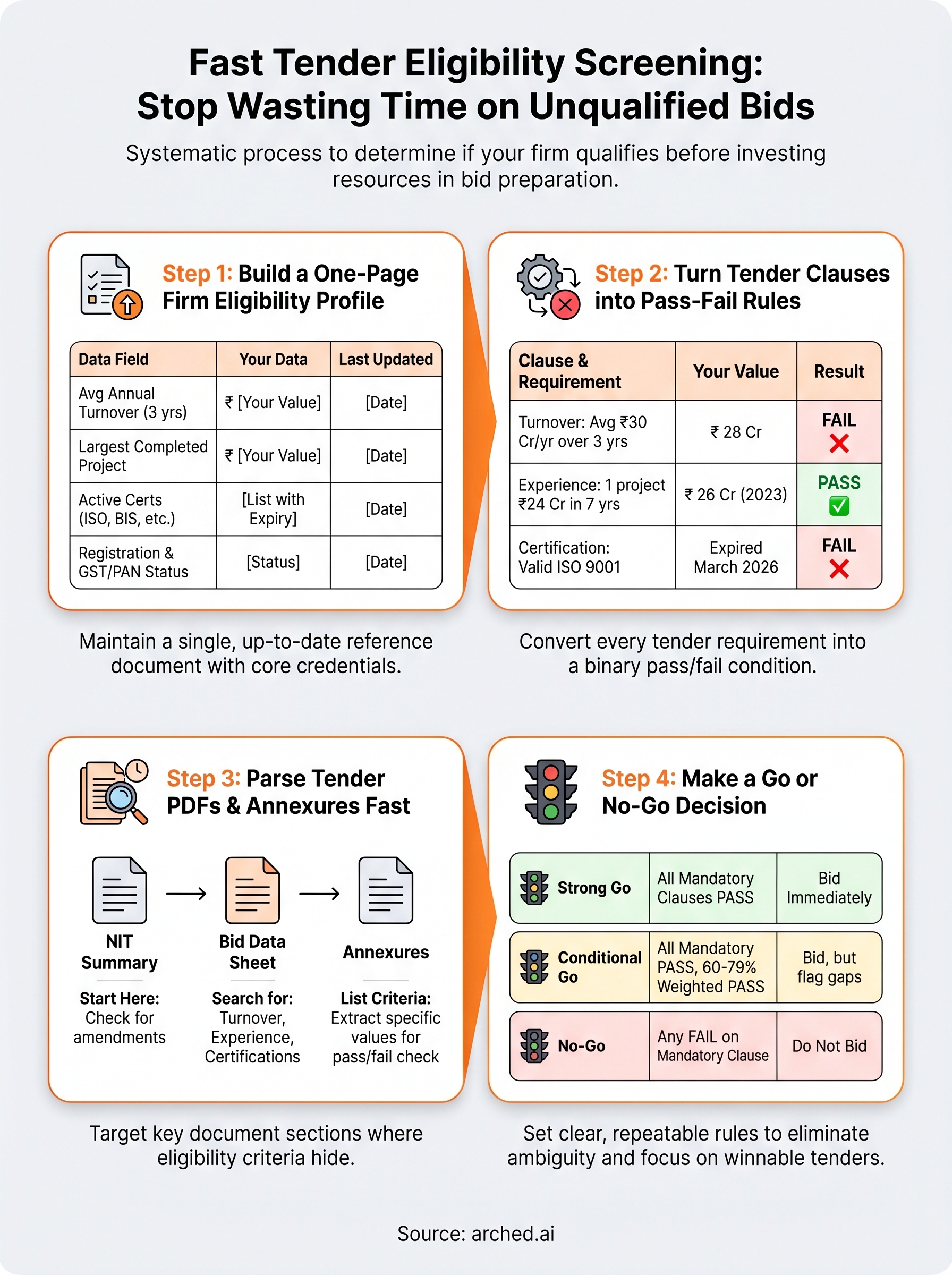
Step 1. Build a one-page firm eligibility profile
Before you can screen any tender, you need a single reference document that captures your firm's credentials in a structured format. Without this, every eligibility check forces you to dig through folders, call your finance team, or pull up old project files. A one-page profile turns that scattered information into a ready-to-compare asset you can run against any tender's requirements in minutes rather than hours.
The four data fields that cover 90% of eligibility checks
Most government tenders in India test you on the same core set of facts. Your profile needs to capture average annual turnover for the last three to five financial years, completed project experience with contract values and client names, active certifications with expiry dates, and your current registration status across portals. These four fields map directly to the categories in the previous section, so filling them in once gives you a foundation that works across CPPP, GeM, and state e-procurement portals without repeating the exercise for every new bid.
A profile that is incomplete or out of date is as dangerous as having no profile at all. Screening against stale data sends you into bids you cannot win.
Use this template as your starting point:
| Field | Your data | Last updated |
|---|---|---|
| Average annual turnover (3 years) | ₹ | |
| Largest single completed project value | ₹ | |
| Project categories (with NIC codes where applicable) | ||
| Active ISO / BIS / sector certifications | List with expiry dates | |
| Contractor class and registration body | ||
| GeM / CPPP / state portal registration status | ||
| GST and PAN status | Active / Pending | |
| EMD instrument types available | DD / BG / Online |
Keeping your profile current
Your profile loses its value the moment a certification expires or a completed project fails to get logged. Set a monthly calendar review to update turnover figures after each quarter closes and add finished contracts as soon as the completion certificate arrives. A shared spreadsheet with clear version dates works far better than relying on memory when a bid deadline is 48 hours away.
Step 2. Turn tender clauses into pass-fail rules
Once your firm profile is ready, the next task is converting raw tender language into a structured set of binary checks. Government tender documents use inconsistent phrasing across departments, which makes eligibility requirements easy to misread under time pressure. Your goal is to pull every requirement from the document and restate it as a simple pass or fail condition that maps directly to a specific field in your firm profile. This step is where most manual screening breaks down, because teams summarize clauses loosely instead of testing them precisely.
Extract requirements clause by clause
Read the eligibility section and all annexures in full before writing anything down. For each requirement you find, restate it as a conditional statement using the exact threshold the tender specifies. Do not paraphrase. Do not round figures. Use the precise number, timeframe, and unit the procuring authority states.
Here is a working template you can copy for each tender:
| Clause | Requirement | Your value | Result |
|---|---|---|---|
| Financial turnover | Average ₹ 30 Cr/year over 3 years | ₹ 28 Cr | FAIL |
| Similar work experience | 1 project of ₹ 24 Cr in last 7 years | ₹ 26 Cr project (2023) | PASS |
| Certification | Valid ISO 9001 certificate | Expired March 2026 | FAIL |
| EMD | ₹ 15 lakhs via DD or BG | BG available | PASS |
| Registration | Class A contractor with PWD | Class B only | FAIL |
This table forces you to state the exact requirement and compare it against a real figure, not a rough impression. Apply the same logic manually to each of your highest-priority bids.
A single FAIL on any mandatory clause ends your eligibility, regardless of how strongly you clear every other criterion.
Handle conditional and "or" clauses carefully
Some tenders offer alternative qualification routes, for example accepting either one project at 80% of the contract value, or two projects that together reach 120%. When you find these clauses, create two separate rows in your table and mark the requirement as passed if either condition holds. Reading "or" clauses as stricter than they are is one of the most common reasons firms incorrectly rule themselves out of bids they could win.
Also watch for clauses that allow joint venture credentials to count toward thresholds. If your firm is bidding as part of a consortium, the lead member's experience often needs to meet a specific percentage of the requirement independently, with the remainder covered by partners. Missing this distinction causes misreads in both directions, so confirm the exact split before you record your result.
Step 3. Parse tender PDFs and annexures fast
Government tender documents are not designed for quick reading. A standard NIT from a state PWD or central ministry will bury critical eligibility clauses across the main notice, a separate set of annexures, and sometimes an addendum issued days after the original upload. Spending time reading these documents linearly, page by page, is how teams miss disqualifiers or misread the threshold that actually applies to their bid. Parsing fast means knowing exactly where to look and in what order.
Where eligibility requirements actually hide in tender documents
Most eligibility content concentrates in three predictable locations: the NIT (Notice Inviting Tender) summary section, the Bid Data Sheet or Instruction to Bidders, and the technical qualification annexures. Financial thresholds almost always appear in the Bid Data Sheet. Specific project experience requirements, certification demands, and contractor class restrictions live in the qualification annexures, which are frequently labeled Annexure A, Annexure II, or Schedule of Requirements depending on the issuing department.
Skipping straight to the annexures before reading the NIT summary risks missing a document-level amendment or corrigendum that overrides the original clause.
Check the portal's corrigenda section before downloading anything. Many firms parse an outdated version of the document and base their eligibility call on superseded numbers.
A fast manual parsing sequence
Use this sequence every time you open a new tender document. It covers the full document set in under 30 minutes for most standard government tenders:

- Download the NIT, Bid Data Sheet, and all annexures as separate files
- Search the Bid Data Sheet for the words "turnover," "experience," "similar work," and "certification" to jump to financial and technical clauses
- Open the eligibility annexure and list every criterion with its exact value in your pass-fail table from Step 2
- Search for "corrigendum" or "amendment" on the portal and cross-check any updated figures against your extracted list
- Flag any clause containing "or," "either," or "joint" for careful re-reading before marking a result
Running this sequence manually on your shortlisted bids cuts your review time significantly compared to reading documents from page one.
Step 4. Make a go or no-go decision confidently
Your pass-fail table from Step 2 gives you the raw data. This step converts that data into an actual decision you can defend to your team without second-guessing. The goal is a repeatable rule that removes ambiguity from the process and stops you from spending another week on a bid that fails a mandatory threshold you already identified.
Set a clear scoring threshold
Run your completed pass-fail table through a simple scoring check before you commit any resources. Every mandatory clause must pass with no exceptions. If even one hard-requirement row shows FAIL, the decision is no-go, regardless of how favorable your other scores are. For conditional or weighted criteria, apply this decision rule:
| Outcome | Mandatory clauses | Weighted criteria | Decision |
|---|---|---|---|
| Strong go | All PASS | 80%+ pass | Bid immediately |
| Conditional go | All PASS | 60-79% pass | Bid, but flag gaps |
| No-go | Any FAIL | Any result | Do not bid |
A conditional go means you qualify but hold a weaker position on non-mandatory criteria like past experience depth or financial buffer above the minimum threshold. In that case, note the specific weaknesses in your bid cover and address them in your technical submission before the deadline.
A no-go decision made at the screening stage costs you nothing. A no-go decision made after two weeks of bid preparation costs your team real time and money.
Know when a near-miss is worth logging
Not every no-go tender should be discarded entirely. If your pass-fail table shows you missed a threshold by a small margin, for example, your average turnover lands at ₹28 crore against a ₹30 crore requirement, log the tender with the exact gap recorded. This data feeds directly into your Gap Analysis work, helping you identify which certifications, project sizes, or financial targets to build toward so you qualify the next time a similar contract appears.
Log near-miss opportunities and the specific credentials your firm needs to move from conditional to strong-go status on higher-value contracts. A shared spreadsheet works well for this, as long as every near-miss gets recorded with the exact figure that blocked you, not just a general note that you "didn't qualify."
Wrap up and start screening faster
Every step in this guide points toward the same outcome: spend your BD hours on bids you can actually win, not on documents that were never a fit. You now have a one-page firm profile, a pass-fail table for converting tender clauses into binary checks, a structured parsing sequence for PDFs and annexures, and a clear decision rule that removes guesswork from your go or no-go call.
Running this process on your highest-priority bids will sharpen your screening discipline immediately. Near-misses get logged, gaps get tracked, and your pipeline stops filling with contracts you were never going to qualify for.
Once you decide a tender is worth bidding, Arched can take the estimate off your plate: send us the project and we deliver a priced BOQ, reviewed by an engineer. See how our estimating service works.
Have a package your team can’t get to? Send it to us. Our engineers check and sign off everything we deliver.