Renew Digital Signature Certificate Online: Steps & Costs
Your Digital Signature Certificate has an expiry date, and if you miss it, you're locked out of GeM, CPPP, and every state e-procurement portal you rely on. No bidding, no document signing, no participation in tenders, full stop. For contractors and BD teams chasing government contracts, a lapsed DSC means lost revenue, not just an inconvenience.
The good news: you can renew digital signature certificate online without starting from scratch. The process is straightforward, but the steps, documentation, and costs vary depending on your Certifying Authority and the class of certificate you hold. Getting it wrong, or getting it late, can sideline your firm during a critical bid window.
This guide breaks down the exact renewal process step by step, covers current pricing, and flags common mistakes that cause delays. At Arched, we help infrastructure firms prepare estimates and BOQs for government bids, but none of that matters if your DSC isn't active when the deadline hits. Let's make sure that doesn't happen.
What you need before you renew online
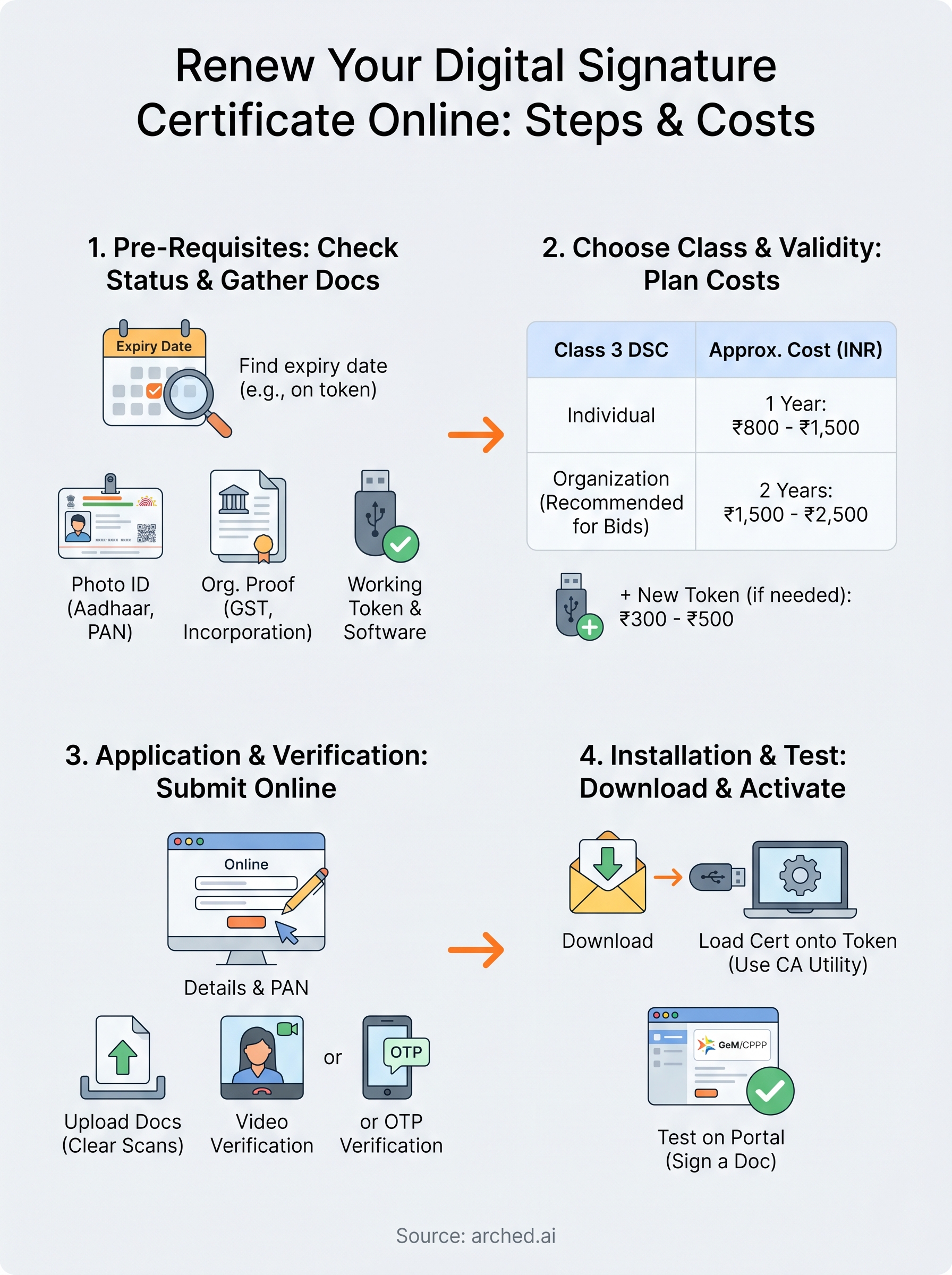
Before you start the renewal process, gather everything in one place. Scrambling for documents mid-application can push your timeline back by several days, and that gap could fall right across a bid deadline. Your Certifying Authority (CA) will ask for identity proof, organization proof, and working hardware before it processes anything.
Identity and organization documents
Your photo ID and organization documents are non-negotiable at every CA. Accepted photo IDs include Aadhaar, PAN card, or a passport. For organization proof, you'll need your GST registration certificate, company incorporation documents, or a partnership deed, depending on your firm's legal structure. If someone other than the DSC holder is submitting the application, include a signed authorization letter.
| Document Type | Accepted Options |
|---|---|
| Photo ID | Aadhaar, PAN card, Passport, Voter ID |
| Address Proof | Aadhaar, utility bill (last 3 months), bank statement |
| Organization Proof | GST certificate, incorporation certificate, partnership deed |
| Authorization | Signed letter if applicant differs from DSC holder |
Token and software readiness
Check that your existing USB cryptographic token is functional and readable by your system before you begin. Most CAs load the renewed certificate directly onto your current token, so a damaged or missing token means sourcing a replacement first, which adds 3 to 5 business days to your timeline. Also confirm that your Java Runtime Environment (JRE) is current and that your browser supports the CA portal, typically a Chromium-based browser with the CA's signing plugin installed.
If your token shows errors or goes unrecognized, contact your CA before starting the renewal application. A faulty token is the most common cause of mid-process delays.
When you renew digital signature certificate online, having these items ready cuts the actual submission time to under 20 minutes.
Step 1. Check your DSC status and expiry
Before you renew digital signature certificate online, confirm your exact expiry date so you know how much time you have left. Most CAs recommend starting the renewal process at least 30 days before expiry to avoid any gap in certificate validity.
How to find your expiry date
Your DSC expiry date is stored on the USB token itself. To read it, plug your token into your computer and follow these steps:
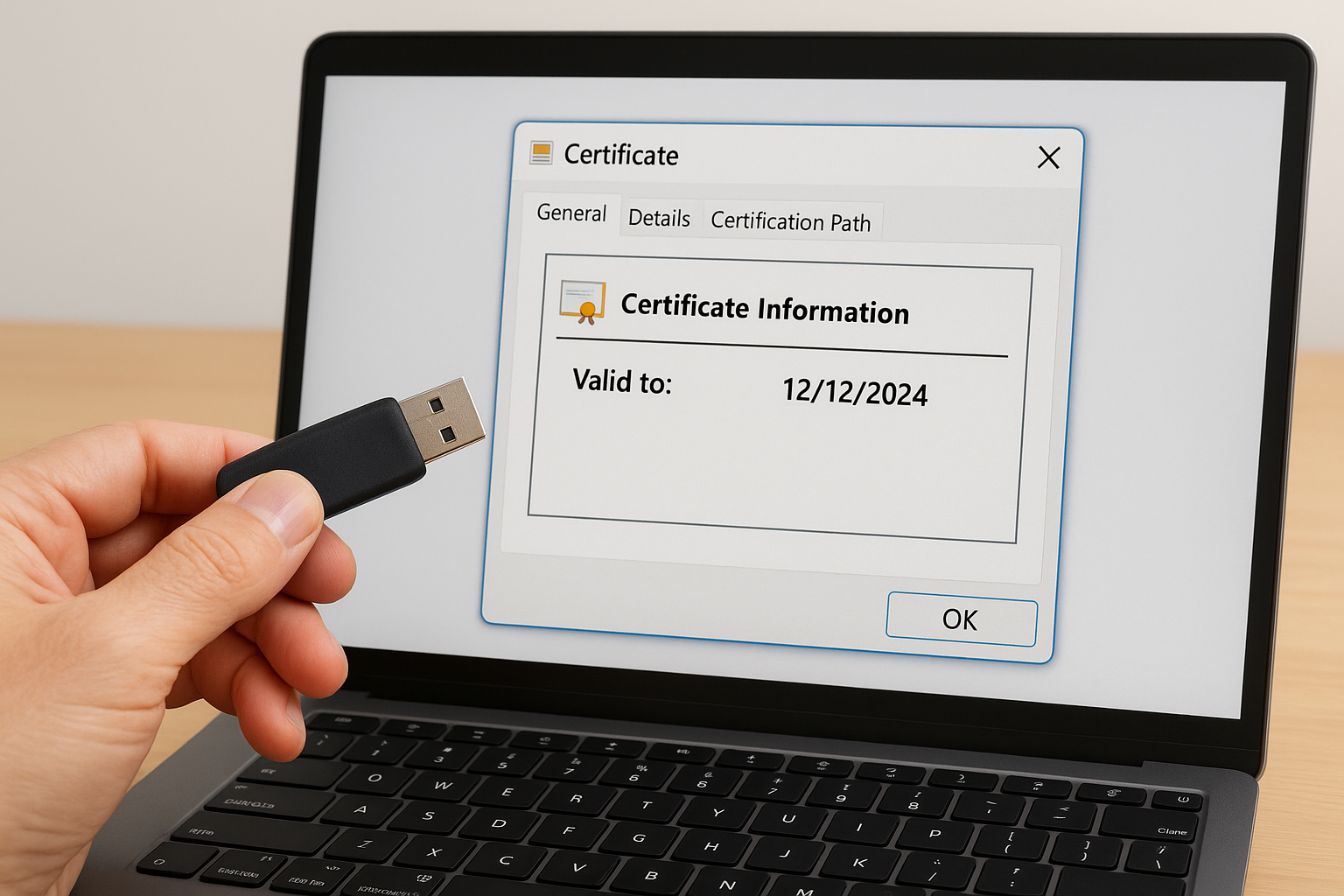
- Open Internet Explorer or Edge in IE compatibility mode and navigate to your CA's portal.
- Click View Certificate or access it through Windows Certificate Manager (certmgr.msc).
- Select your certificate under Personal > Certificates and open the General tab.
- Note the "Valid to" date listed there.
Alternatively, log into the CA portal where you originally purchased the DSC. Most portals show your certificate status and expiry date in the account dashboard.
What to do if your DSC is already expired
An expired DSC is not automatically invalid for renewal. Most CAs allow you to renew within a short grace window after expiry, typically 30 days, but you will face a brief gap where you cannot sign documents. Contact your CA's support team immediately to confirm your options before submitting the renewal form.
Step 2. Pick the right DSC type and plan costs
Before you renew digital signature certificate online, confirm that you're renewing the correct class and type of DSC. Picking the wrong one means reapplying from scratch, which wastes both time and money.
DSC class and signing type
Class 3 DSC is mandatory for government portals including GeM, CPPP, and all state e-procurement systems. Within Class 3, you'll choose between Individual (issued to a specific person) or Organization (issued in the firm's name alongside the individual's details). For bid signing and document submission on government portals, you need a Class 3 Organization DSC with both signing and encryption capability.
If you're unsure which type your firm uses, check the certificate details in Windows Certificate Manager under the "Subject" field. It will show whether the certificate is tied to an individual or an organization.
Renewal costs by validity period
Renewal pricing varies across CAs but follows a predictable structure. One-year renewals typically cost between ₹800 and ₹1,500, while two-year renewals range from ₹1,500 to ₹2,500. Some CAs add ₹300 to ₹500 for a new USB token if your current one is damaged.
| Validity | Approx. Cost (INR) |
|---|---|
| 1 Year | ₹800 - ₹1,500 |
| 2 Years | ₹1,500 - ₹2,500 |
| New token (if needed) | ₹300 - ₹500 extra |
Step 3. Submit the renewal application and verification
With your documents ready and your DSC type confirmed, log into your CA's portal and locate the renewal or re-issuance section. Most major CAs, including eMudhra, Sify, and NSDL, keep this under a clearly labeled "Renew DSC" tab.
Fill out and upload the renewal form
Complete the online application form with your personal details, organization name, and PAN number exactly as they appear on your supporting documents. Any mismatch between the form and your uploaded files triggers a rejection and restarts the clock. After filling in the form, upload clear scans of your identity and organization documents in the format specified by your CA, typically PDF or JPEG under 2 MB per file.
Double-check every uploaded document for legibility before submitting. Blurry scans are the second most common cause of renewal delays after token issues.
Complete the video or OTP verification step
After submission, your CA will prompt you to verify your identity through a video call or an Aadhaar-linked OTP, depending on their process. For video verification, have your original photo ID ready on screen. This step is what allows you to renew digital signature certificate online without visiting a physical office. Once verification is approved, processing typically takes 1 to 3 business days.

Step 4. Install the renewed DSC and get it working
Once your CA approves the renewal, you'll receive an email with a download link or a direct notification through the portal. Act on it the same day. Delays in loading the certificate onto your token can create a gap in your signing capability, even after the CA has processed everything.
Download and load the certificate onto your token
Plug your USB cryptographic token into your computer and open the CA's token management utility. Use the utility to import the renewed certificate file directly onto the token. Most CAs provide a step-by-step walkthrough on their portal for this specific action. Keep your token PIN ready, as the utility will prompt you for it during the import.
If the import fails, clear any expired certificates from the token first using the utility's delete function, then retry the import.
Test your DSC on a government portal
After loading the certificate, log into GeM or CPPP and attempt a test action such as signing a document or updating your profile signature. This confirms that your renewed DSC is working correctly on the portals you rely on.
Completing this check right away lets you renew digital signature certificate online without facing surprise failures during an actual bid submission.
Next steps
Your DSC renewal is complete. Now keep it active. Set a calendar reminder 30 days before your next expiry date so you never land in a bid window without a valid certificate. When you renew digital signature certificate online again, you'll move faster because your documents and token are already organized.
A working DSC is just the foundation. The real challenge for most BD teams is identifying the right tenders to bid on across hundreds of government portals before a competitor does. Having a system in place matters more than speed alone.
Have a package your team can’t get to? Send it to us. Our engineers check and sign off everything we deliver.