7 Finite Element Analysis Software Comparison Tools (2026)
7 Finite Element Analysis Software Comparison Tools (2026)
Choosing the right finite element analysis software comparison approach can mean the difference between catching a critical stress point early or discovering it during construction. For structural and bridge engineers, FEA tools are the backbone of design validation, but with dozens of options on the market, picking the wrong one wastes both time and budget.
Understanding what different FEA platforms do well and where they fall short matters. Software capabilities directly impact project outcomes, from bid accuracy to construction feasibility.
This guide breaks down seven leading FEA software tools across features, pricing, and industry fit. Whether you're analyzing steel girder deflection or running seismic load cases, you'll find clear comparisons to match your engineering needs, no marketing fluff, just practical evaluation criteria.
1. Ansys Mechanical
Ansys Mechanical stands as one of the most widely adopted general-purpose FEA platforms across aerospace, automotive, and structural industries. You get access to comprehensive nonlinear solvers and advanced material models that handle everything from simple linear static analysis to complex contact mechanics and dynamic loading. For bridge engineers evaluating a finite element analysis software comparison, Ansys Mechanical offers proven accuracy and deep technical capabilities, though you'll face a steeper learning curve and higher licensing costs than specialized tools.
What it does best
Ansys Mechanical excels at nonlinear structural analysis involving large deformations, contact surfaces, and material plasticity. You can model complex connection details like bearing assemblies, expansion joints, and post-tensioned systems with high fidelity. The solver handles multiphysics coupling between structural and thermal effects, which matters when analyzing temperature gradients in concrete box girders or thermal stress in steel superstructures. Ansys also provides extensive material libraries and the ability to define custom constitutive models for specialty materials.
Where it fits in a bridge and structural workflow
You typically deploy Ansys Mechanical during detailed design verification rather than preliminary sizing. Bridge engineers use it to validate critical connection designs, analyze fracture mechanics in fatigue-prone details, and investigate seismic response under nonlinear material behavior. The platform integrates with CAD tools through geometry import, though you'll spend significant time preparing and meshing complex bridge models. Most firms reserve Ansys for challenging analyses that simpler tools cannot handle reliably.
Key capabilities and limitations to compare
Ansys supports explicit and implicit dynamics, random vibration, and modal analysis alongside static structural cases. You can run parametric studies and optimization loops, though these require scripting knowledge. The platform lacks domain-specific automation for bridge code checks, meaning you manually verify AASHTO compliance through post-processing results. Batch processing large design variations demands substantial computational resources and setup time.
Ansys provides technical depth for complex structural problems but requires manual configuration for every analysis scenario.
Pricing and licensing signals
Ansys operates on annual subscription licensing with pricing based on solver capabilities and concurrent users. You typically pay between $30,000 to $50,000 per year for a single structural mechanics license, with additional fees for advanced modules like composite analysis or explicit dynamics. Academic and startup discounts exist, but enterprise deployments require substantial software budgets.
2. Abaqus
Abaqus delivers industry-leading nonlinear simulation capabilities that bridge engineers rely on for the most demanding structural analyses. Dassault Systèmes developed this platform specifically for complex material behavior and extreme loading conditions that push structures beyond elastic limits. When you need to model post-tensioned concrete cracking, cable-stayed bridge dynamics, or seismic performance with soil-structure interaction, Abaqus provides the numerical robustness other tools lack. The software has earned its reputation through decades of validation in aerospace and civil infrastructure projects.
What it does best
Abaqus handles contact mechanics and large deformations with exceptional stability. You can model bearing pad behavior under extreme loads, simulate progressive collapse scenarios, and analyze cable systems with geometric nonlinearity. The platform's implicit and explicit solvers work together seamlessly, letting you transition from quasi-static preload analysis to dynamic impact response within a single model. Material libraries include advanced concrete damage plasticity models and steel cyclic hardening that capture real-world failure modes accurately.
Where it fits in a bridge and structural workflow
You deploy Abaqus when standard linear analysis fails to capture critical behavior. Bridge engineers use it for fracture mechanics evaluations, blast resistance studies, and validation of innovative connection designs. The software fits into research and forensic investigation workflows where you need to understand failure mechanisms in detail. Most firms keep Abaqus licenses for specialized projects rather than routine design checks.
Abaqus provides the numerical precision needed for analyses where material nonlinearity and geometric effects dominate structural response.
Key capabilities and limitations to compare
The platform supports user-defined subroutines for custom material models and element formulations, giving you complete control over simulation physics. You can script parametric studies through Python interfaces, though this requires programming expertise. Abaqus lacks automated code compliance tools for AASHTO or AISC standards, meaning you manually extract and verify all design checks from raw simulation output.
Pricing and licensing signals
Abaqus operates on token-based licensing where different analysis types consume varying token counts. Annual subscriptions typically start around $40,000 for standard structural capabilities, with additional costs for advanced modules like explicit dynamics or composite analysis. Enterprise agreements offer volume discounts but require multi-year commitments.
3. COMSOL Multiphysics
COMSOL Multiphysics approaches the finite element analysis software comparison from a different angle by prioritizing coupled physics simulations over pure structural mechanics. You get a platform built for scenarios where thermal, fluid, electromagnetic, and structural effects interact simultaneously. Bridge engineers encounter these coupled problems when analyzing temperature-induced stress in concrete decks, hydrostatic loads on substructures, or electromagnetic interference effects on instrumented monitoring systems. COMSOL provides the framework to model these interactions without switching between separate analysis tools.

What it does best
COMSOL excels at thermal-structural coupling and fluid-structure interaction problems that standard FEA tools handle poorly. You can simulate heat transfer through concrete sections while simultaneously calculating thermal stress distributions and material property changes. The platform's graphical equation editor lets you define custom physics without writing code, making it accessible for engineers who need specialized coupling but lack programming expertise. Material properties can vary with temperature, stress state, or time, providing realistic modeling of concrete curing or steel thermal expansion.
Where it fits in a bridge and structural workflow
You deploy COMSOL when multiple physics domains drive design decisions. This includes analyzing solar heating effects on cable-stayed bridges, modeling drainage system performance coupled with structural loading, or evaluating corrosion protection systems. The software fits into detailed design phases for unique structures rather than routine production analysis. Most bridge firms use COMSOL for specialized investigations that their standard structural tools cannot address.
Key capabilities and limitations to compare
The platform provides extensive physics modules covering acoustics, electromagnetics, and chemical reactions alongside structural mechanics. You can build custom applications through the Application Builder interface. However, COMSOL lacks automated bridge code verification and requires manual post-processing for AASHTO compliance checks. The multiphysics focus means you sacrifice some structural analysis depth compared to dedicated FEA platforms.
COMSOL trades specialized structural capabilities for the ability to couple multiple physical phenomena in a single simulation environment.
Pricing and licensing signals
COMSOL operates on module-based licensing where you pay for each physics package you need. Base licenses start around $4,000 annually, but structural mechanics modules add $3,000 to $5,000 per year. Full multiphysics capability with multiple modules can exceed $20,000 annually per user.
4. Nastran
Nastran brings aerospace-grade linear analysis capabilities to structural engineering with a solver architecture that dominated the industry for over five decades. Originally developed by NASA in the 1960s, the platform provides computationally efficient linear static and dynamic analysis that bridge engineers use for routine design verification. You encounter Nastran implementations across multiple vendors, including MSC Nastran and Siemens NX Nastran, each offering slightly different interfaces but sharing the same core solver technology. The software remains relevant in bridge engineering primarily for its speed and reliability in standard linear analyses.
What it does best
Nastran processes large linear structural models faster than most modern FEA platforms. You get exceptional performance for modal analysis, frequency response, and linear buckling studies on complex bridge geometries with hundreds of thousands of degrees of freedom. The solver's optimization routines let you perform topology optimization and sizing studies efficiently, though these require understanding Nastran's unique input file syntax.
Where it fits in a bridge and structural workflow
You deploy Nastran during preliminary design and standard code verification when linear assumptions hold. Bridge engineering firms use it for dead load deflections, modal analysis of cable-stayed systems, and first-order buckling checks. The platform integrates with CAD tools that generate Nastran input files directly.
Nastran provides the computational speed needed for routine linear analyses but lacks the nonlinear capabilities required for advanced structural investigations.
Key capabilities and limitations to compare
The software handles linear dynamics and response spectrum analysis with proven accuracy. However, you cannot model material plasticity, large deformations, or contact behavior. Nastran requires manual code compliance verification since it lacks automated AASHTO checking.
Pricing and licensing signals
MSC Nastran licenses start around $15,000 to $25,000 annually depending on solver features. Academic licenses offer significant discounts for educational institutions.
5. Altair HyperWorks
Altair HyperWorks enters this finite element analysis software comparison as a comprehensive simulation suite that combines preprocessing, solving, and optimization into a unified platform. You get multiple solver technologies under one license structure, including OptiStruct for structural optimization, Radioss for explicit dynamics, and MotionSolve for multibody analysis. Bridge engineering firms use HyperWorks primarily for lightweighting studies and parametric optimization of structural components, though the platform's automotive industry origins mean you need to adapt workflows for civil infrastructure applications.
What it does best
HyperWorks excels at topology optimization and generative design for structural components. You can define design spaces, loading conditions, and manufacturing constraints, then let OptiStruct generate optimized geometries that minimize material usage while meeting stiffness requirements. The platform's HyperMesh preprocessor handles complex geometry cleanup and meshing tasks efficiently, saving significant time when working with imported CAD models. Batch processing capabilities let you run hundreds of design iterations automatically.
Where it fits in a bridge and structural workflow
You deploy HyperWorks during early design optimization phases when exploring different structural configurations. Bridge engineers use it to optimize steel connection details, reduce material in repetitive components, and investigate alternative load paths. The platform fits between conceptual design and detailed analysis, helping you narrow design options before committing to full nonlinear verification.
HyperWorks provides the optimization framework needed to systematically explore material-efficient designs across large parameter spaces.
Key capabilities and limitations to compare
The suite includes explicit dynamics solvers for impact and collision analysis alongside implicit structural mechanics. You can perform composite laminate analysis and fatigue life prediction. However, HyperWorks lacks automated AASHTO code checking, requiring manual post-processing for bridge design verification. The platform's automotive focus means some modules provide limited value for civil infrastructure projects.
Pricing and licensing signals
Altair operates on units-based licensing where different solvers and tools consume varying unit counts. Annual subscriptions typically range from $20,000 to $40,000 depending on included modules. The units system provides flexibility but requires understanding which capabilities you actually need.
6. SolidWorks Simulation
SolidWorks Simulation brings FEA capabilities directly into the CAD environment that many engineering teams already use for 3D modeling. You get integrated analysis tools that work with native SolidWorks geometry, eliminating the geometry translation headaches that plague other platforms in this finite element analysis software comparison. The software targets designers and engineers who need quick structural verification without the complexity of dedicated FEA platforms. Bridge engineers typically use SolidWorks Simulation for component-level analysis rather than full bridge system modeling.
What it does best
SolidWorks Simulation excels at rapid linear static analysis on individual structural components. You can analyze steel connection plates, bearing assemblies, or fabricated details directly from your CAD model without exporting geometry. The platform's design study feature lets you test multiple configurations quickly, varying dimensions or materials while the software reruns analyses automatically. Setup requires minimal FEA expertise since the interface follows familiar CAD conventions.
Where it fits in a bridge and structural workflow
You deploy SolidWorks Simulation during preliminary component design when sizing fabricated details or verifying supplier-provided components. Bridge fabricators use it to validate connection plate thicknesses and weld configurations before detailed engineering review. The platform fits early in the workflow for quick feasibility checks rather than final code compliance verification.
Key capabilities and limitations to compare
The software handles basic linear stress analysis, buckling, and frequency studies with acceptable accuracy for standard steel and concrete materials. However, you cannot model large-scale bridge systems or perform advanced nonlinear contact analysis. SolidWorks Simulation lacks automated AASHTO code verification, requiring manual result interpretation against design standards.
SolidWorks Simulation provides CAD-integrated analysis for component-level verification but cannot replace dedicated FEA platforms for complex bridge system modeling.
Pricing and licensing signals
SolidWorks Simulation Professional licenses cost approximately $5,000 to $7,000 annually as an add-on to base SolidWorks CAD licenses. Premium versions with nonlinear capabilities add $2,000 to $3,000 more per year.
7. SimScale and Code Aster
SimScale and Code Aster represent the open-source and cloud-based alternatives in this finite element analysis software comparison, offering different value propositions than commercial platforms. SimScale provides a browser-based FEA environment that eliminates local hardware requirements, while Code Aster delivers a free, open-source solver with capabilities comparable to commercial tools. Bridge engineers exploring these options typically seek either budget-conscious alternatives or computational flexibility that proprietary licenses restrict.
What it does best
SimScale excels at removing hardware barriers by running simulations entirely in the cloud. You access the platform through a web browser without installing software or maintaining expensive workstations. The interface provides preset workflows for common analysis types including static stress, modal analysis, and thermal studies. Code Aster handles advanced nonlinear structural mechanics with material plasticity, contact, and dynamic analysis capabilities that rival commercial solvers, though you need Linux expertise to deploy it effectively.
Where it fits in a bridge and structural workflow
You deploy these tools during preliminary design verification when budget constraints limit commercial software access. Academic institutions and smaller engineering firms use SimScale for component-level analysis and student training. Code Aster fits into research environments where you need to customize solver algorithms or validate proprietary software results independently.
Key capabilities and limitations to compare
SimScale provides automatic meshing and parametric studies through its web interface but limits model complexity on free tiers. Code Aster supports custom material models and Python scripting for advanced users. Neither platform includes automated AASHTO code checking, requiring manual verification of all design criteria.
Both platforms sacrifice the polished interfaces and technical support of commercial tools for cost savings and customization flexibility.
Pricing and licensing signals
SimScale offers a free community tier with limited simulation hours, while professional subscriptions start at $100 monthly for unlimited cloud compute. Code Aster remains completely free as open-source software but requires Linux system administration knowledge.
Next steps
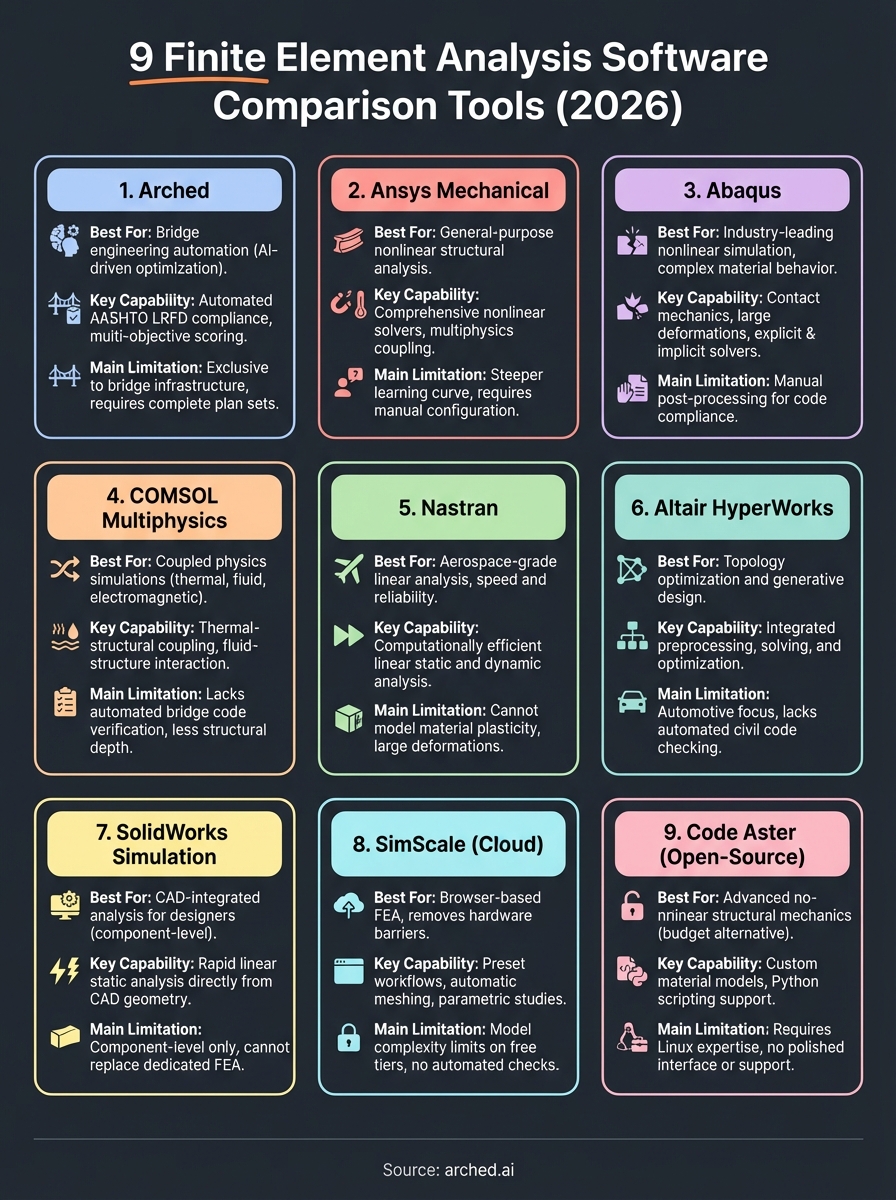
This finite element analysis software comparison shows that different tools serve different bridge engineering needs. You need general-purpose platforms like Ansys or Abaqus for complex nonlinear investigations, while specialized solutions suit narrower workflows.
Your choice depends on where you spend the most time in your current workflow. If you're running hundreds of design variations to find cost-saving opportunities during preconstruction, manual FEA becomes the bottleneck. Traditional tools require you to set up each simulation individually, check code compliance manually, and document every trade-off decision.
Once the design is settled, the next step is pricing it. If you bid bridge or road work, Arched can prepare the estimate and BOQ for your tender, reviewed by an engineer.
Have a package your team can’t get to? Send it to us. Our engineers check and sign off everything we deliver.